Meta title: Best IT Training Institute in Bhubaneswar: 2026 Career Roadmap
Meta description: Explore iTrainU’s 12-month IT career roadmap for Bhubaneswar learners, covering CCNA, MCSE, Linux, AWS, English, Cloud, DevOps, Cyber Security, SD-WAN, Fortigate, and OJT.
Bhubaneswar has a growing technology, education, and services ecosystem. Students from universities, fresh graduates, career switchers, and working professionals are preparing for roles in networking, cloud computing, DevOps, cybersecurity, and IT support.
However, completing a short course isn’t always enough. Employers also look for practical troubleshooting ability, communication skills, project experience, and familiarity with real IT tools.
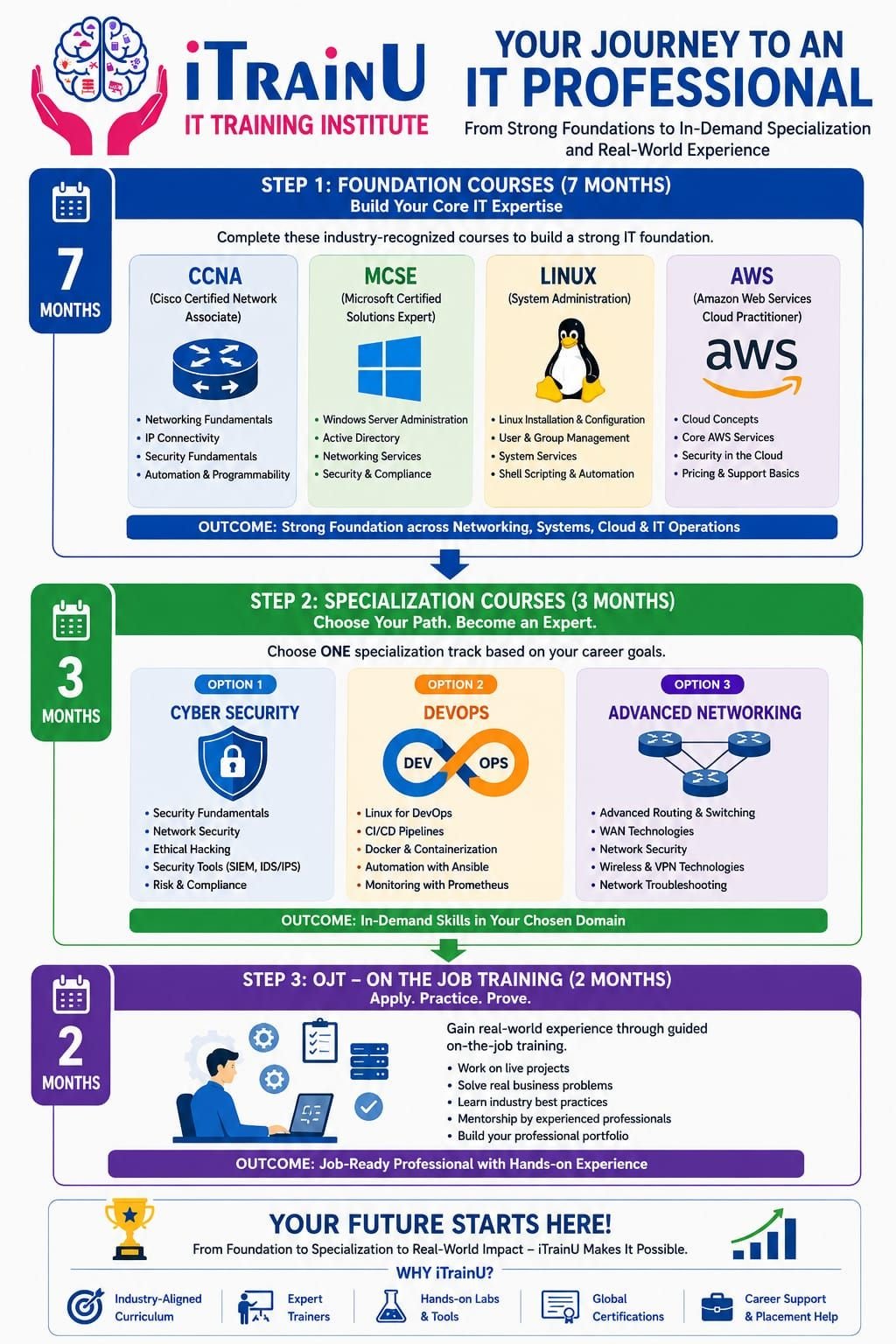
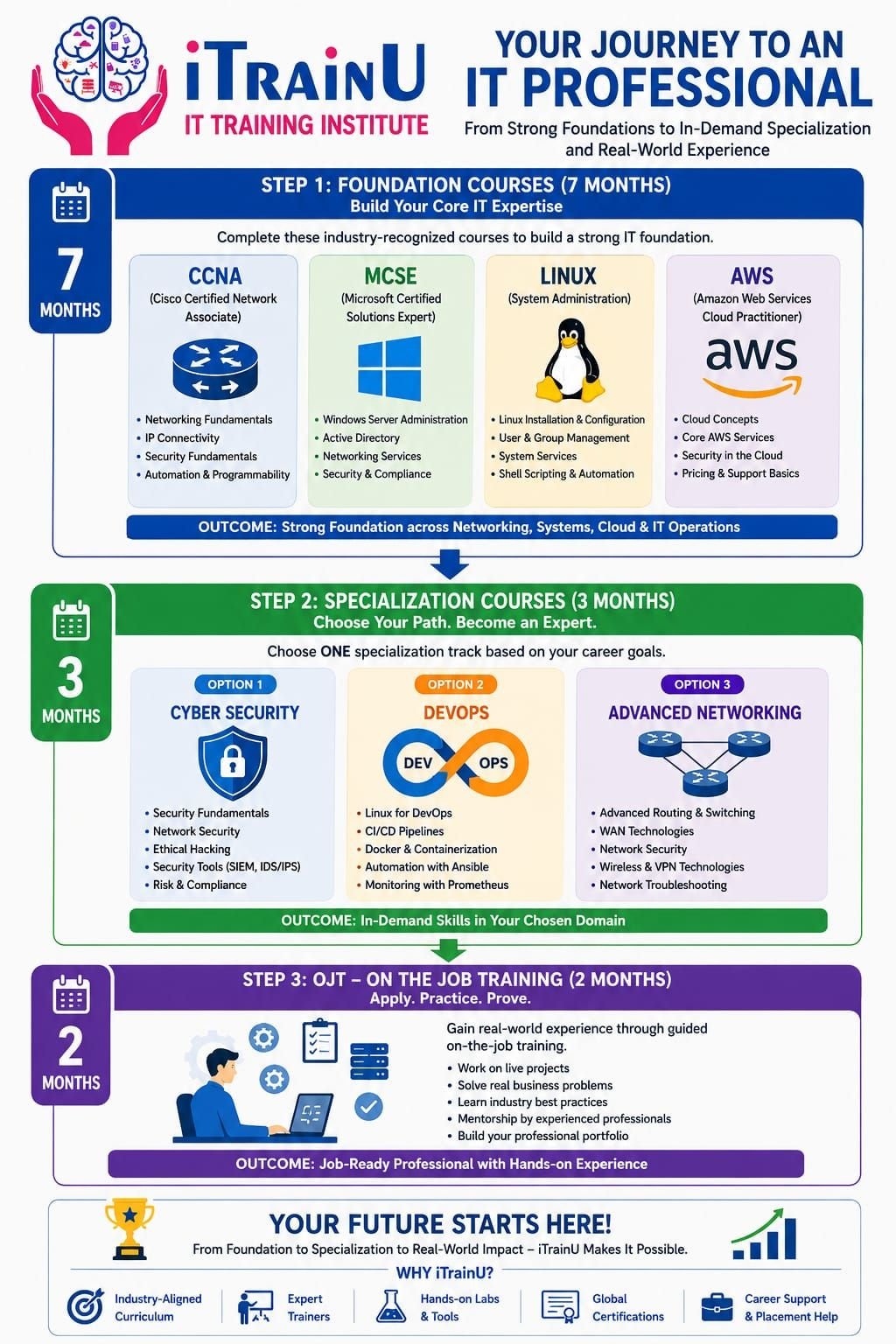
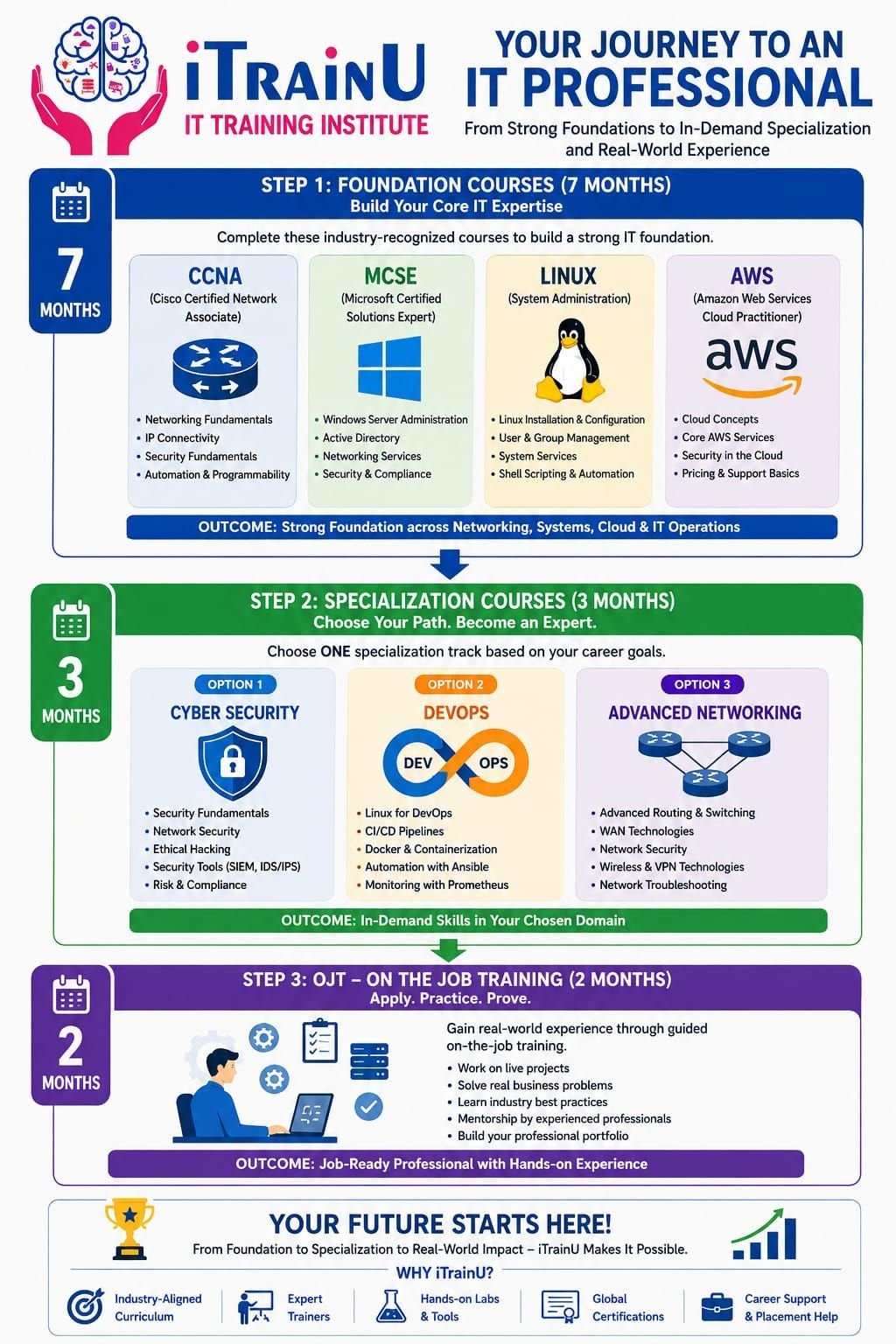
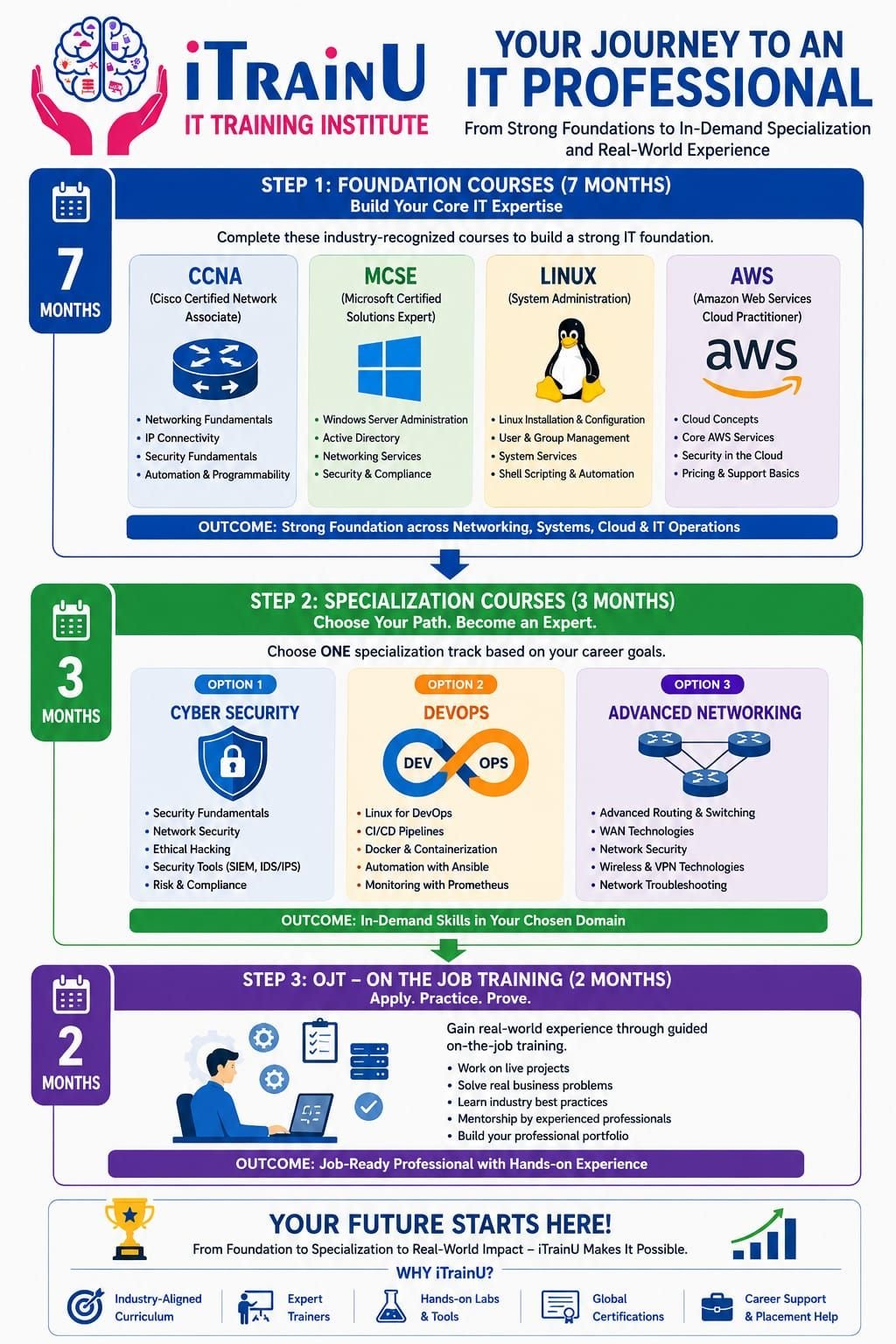
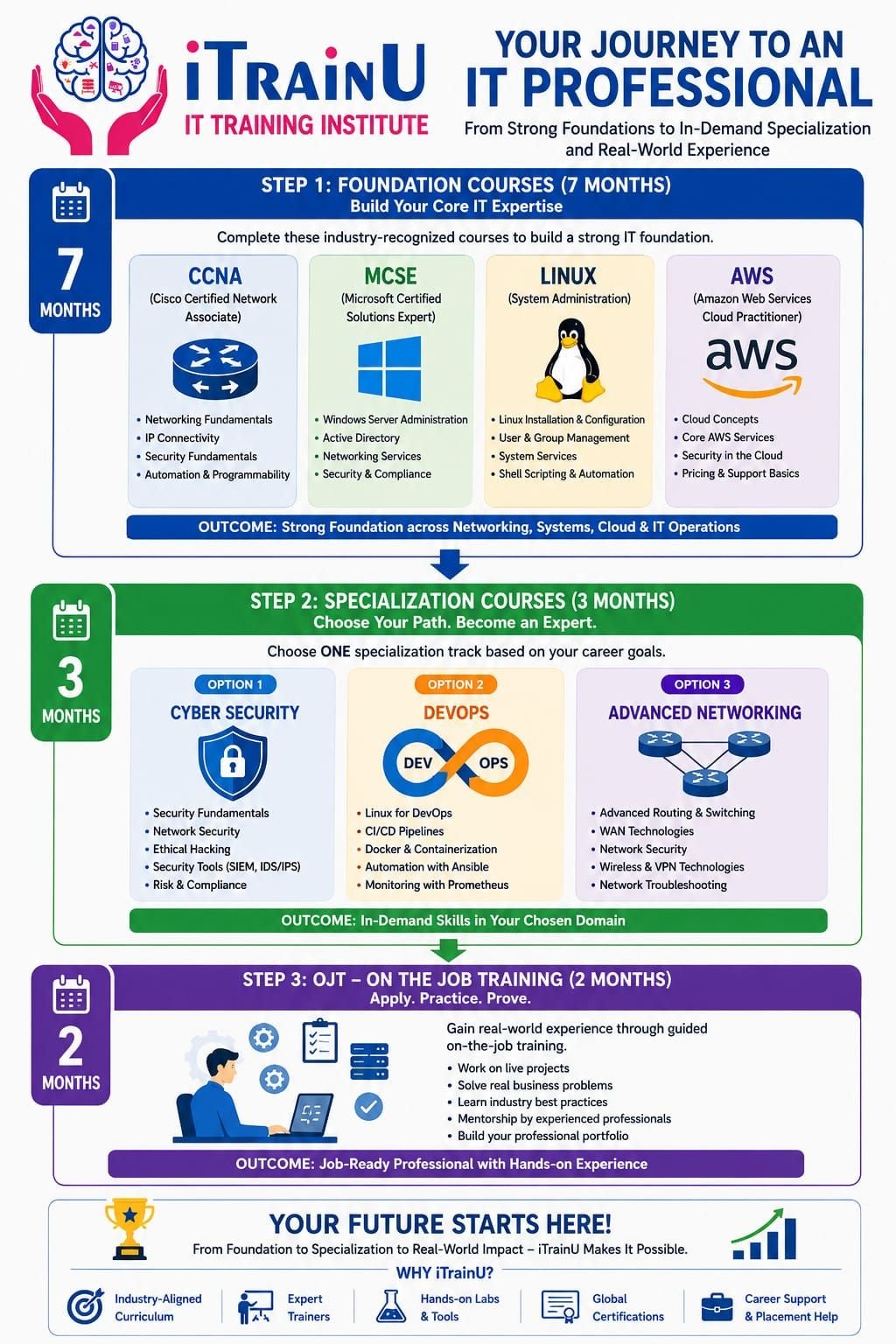
If you’re comparing the best IT training institute in Bhubaneswar, look for a structured pathway rather than isolated training. iTrainU’s 12-month career roadmap combines foundation skills, a focused specialization, and on-the-job training.
Contact iTrainU: 🌐 Website · ✉️ Email: info@itrainu.in · 💬 WhatsApp: +91 74155 41833

Why IT Training Matters for Learners in Bhubaneswar
Bhubaneswar learners often have access to strong academic institutions and growing technology communities. Yet, there can be a gap between academic knowledge and workplace requirements.
Before practical training
- You may understand networking theory but struggle to troubleshoot a failed connection.
- You may know cloud terminology but not know how to configure access or deploy a service.
- You may list cybersecurity concepts on your resume without completing a practical security task.
- You may find it difficult to explain technical issues clearly during interviews.
After a structured learning pathway
- You can configure and troubleshoot networks.
- You can work with Linux servers and cloud services.
- You can build projects using DevOps tools.
- You can understand security risks and defensive controls.
- You can demonstrate your skills through labs, assignments, and OJT experience.
For learners in Patia, Infocity, Jaydev Vihar, Saheed Nagar, and nearby areas, flexible online and classroom options can make professional training easier to manage alongside college or employment. iTrainU’s published contact information lists its training centre in Indore, so Bhubaneswar learners should contact the institute to confirm current live batch and delivery options.
iTrainU’s 12-Month IT Career Roadmap
The pathway has three stages:
- Seven-month Foundation Level
- Three-month Specialization Track
- Two-month On-the-Job Training
This sequence is useful because you first build broad IT knowledge, then develop depth in one career area, and finally practise in a professional environment.
Stage 1: Seven-Month Foundation Level
The Foundation Level is designed for beginners, fresh graduates, and professionals who need a stronger technical base.
1. CCNA and networking
CCNA is a networking foundation that explains how devices communicate across local and wide-area networks.
You learn:
- IP addressing and subnetting
- VLANs and trunking
- Routing and switching
- OSPF and static routes
- DHCP, NAT, ACLs, and VPN basics
- Wireless networking
- Network troubleshooting and SSH
CCNA matters because almost every cloud, security, and enterprise IT environment depends on networking. A cloud engineer who understands subnets and routing can design safer and more reliable infrastructure.
Explore the iTrainU CCNA Training course.
2. Linux system administration
Linux is an operating system widely used for servers, cloud platforms, containers, and security tools.
You practise:
- Files, directories, permissions, and ownership
- Users, groups, and processes
- Package management
- Services and logs
- SSH and basic network commands
- Shell scripting and automation
- Server troubleshooting
Linux is important for IT professionals because many production systems run on Linux. DevOps pipelines, web servers, cloud workloads, and cybersecurity labs also depend heavily on Linux.
Example command practice:
# Check system information
hostnamectl

# Display IP addresses
ip addr

# Test connectivity
ping -c 4 example.com

# Check running services
systemctl --type=service --state=running
3. MCSE and Microsoft technologies
MCSE-focused learning develops skills in Windows Server and enterprise administration.
Key areas include:
- Windows Server management
- Active Directory
- DNS and DHCP
- Group Policy
- User and access management
- System security and compliance
- Enterprise troubleshooting
Although Microsoft certifications and product names evolve, Windows administration remains relevant in corporate IT environments. Learning both Linux and Microsoft technologies helps you support mixed infrastructure.
4. AWS cloud fundamentals
AWS is a cloud platform that provides computing, storage, networking, identity, and monitoring services.
You build a foundation in:
- Cloud concepts and service models
- EC2 and virtual machines
- S3 storage
- VPCs and subnets
- IAM and security groups
- Load balancing
- Monitoring and cost awareness
You can review the iTrainU AWS training options and ask the team about the current syllabus.
5. English and professional communication
Technical skills are more useful when you can explain your work clearly. The Foundation Level includes English and communication development to support:
- Interview introductions
- Ticket and incident updates
- Client communication
- Technical documentation
- Team collaboration
- Resume and project discussions
Why CCNA, Linux, and MCSE Work Well Together
These subjects form a practical IT support and infrastructure combination.
- CCNA helps you understand connectivity.
- Linux helps you manage server-based systems.
- MCSE helps you work with Microsoft enterprise environments.
- AWS helps you understand modern cloud infrastructure.
- English helps you communicate technical information professionally.
For example, when a web application is unavailable, you may need to check DNS, test connectivity, inspect Linux logs, verify firewall rules, and confirm cloud security settings. A combined foundation helps you approach the problem systematically.
Stage 2: Three-Month Specialization Track
After building your foundation, you choose one specialization.

Track A: Cloud and DevOps
This track is suitable if you enjoy automation, deployment, cloud platforms, and system reliability.
You can study:
- Git and version control
- Jenkins and CI/CD pipelines
- Docker containers
- Kubernetes fundamentals
- Ansible automation
- Monitoring and logging
- Cloud deployment workflows
Review the iTrainU DevOps Training course.
Track B: Cyber Security and Ethical Hacking
Cybersecurity is a long-term career area because organisations must protect data, applications, networks, and users.
Many companies need security controls for:
- Customer and employee information
- Cloud workloads
- Remote access
- Endpoints and servers
- Compliance requirements
- Incident detection and response
Training may include ethical hacking concepts, vulnerability assessment, network security, penetration-testing methodology, SIEM, IDS/IPS, and security reporting.
Ethical hacking must always be performed with written permission and inside authorised lab environments. The goal is to identify and fix weaknesses, not to access systems unlawfully.
Read more about iTrainU Cyber Security and Ethical Hacking Training.
Track C: Advanced Networking
This track is useful for learners who want to progress from basic networking into enterprise infrastructure.
Topics can include:
- Advanced routing and switching
- WAN technologies
- SD-WAN concepts
- Aruba networking
- Fortigate firewall administration
- VPNs and security policies
- Network monitoring and troubleshooting
SD-WAN is a software-defined approach to managing wide-area connectivity. It can improve visibility, policy control, application routing, and branch connectivity.
Fortigate is an enterprise firewall platform used for network security, traffic inspection, VPNs, access policies, and threat prevention.
SD-WAN and Fortigate skills can improve earning potential because they are specialised capabilities. However, salary depends on your experience, project work, certifications, location, and interview performance.
Stage 3: Two-Month OJT at Fluke Infotech
The final stage is On-the-Job Training, or OJT. According to the iTrainU pathway, learners complete two months of practical exposure at Fluke Infotech.
During OJT, you should focus on:
- Following workplace processes
- Recording incidents and solutions
- Working with tickets and escalation rules
- Applying security and change-control practices
- Communicating with teams and users
- Building a portfolio of permitted project work
OJT helps convert training knowledge into workplace habits.
Placement Assistance and Career Preparation
Training should include more than technical classes. iTrainU’s placement assistance approach includes:
- Resume development
- Interview preparation
- Mock interviews
- Soft-skills training
- Career guidance
- Mentorship
- Job-oriented projects

You can learn more through the iTrainU Placement Assistance page. Placement assistance supports your job search, but your results will still depend on attendance, practice, communication, technical performance, and the roles available.
Best Practices for Your 12-Month Plan
- Practise every technical topic in a lab.
- Keep notes for commands, diagrams, and troubleshooting steps.
- Build at least two documented projects.
- Use Git to maintain scripts and configuration examples.
- Review networking and Linux concepts weekly.
- Never copy a project without understanding it.
- Ask trainers to explain the business purpose of each tool.
- Prepare a clear answer for every project listed on your resume.
- Use only authorised systems for cybersecurity practice.
Common Mistakes to Avoid
- Choosing a course only because it promises a high salary.
- Ignoring English and interview preparation.
- Learning too many tools without mastering fundamentals.
- Watching videos without performing lab tasks.
- Listing SD-WAN, Fortigate, or AWS on your resume without practical experience.
- Using offensive security tools against real systems without permission.
- Failing to document projects and troubleshooting results.
Pro Tips for Bhubaneswar Learners
- Create a local study routine: Reserve fixed hours before or after college or work.
- Use a portfolio format: Document the problem, tools, steps, result, and lessons learned.
- Connect your skills: Explain how CCNA supports AWS networking and how Linux supports DevOps.
- Target entry-level roles: Consider NOC Engineer, Network Support Engineer, Linux Administrator, Cloud Support Associate, SOC Analyst, and IT Support Engineer roles.
- Ask about batch flexibility: Confirm online, classroom, weekend, lab, and OJT availability before enrolling.
Stay connected with iTrainU: 🔗 LinkedIn – iTrainU Institute · ◎ Instagram – @itrainu · ▶ YouTube – iTrainU Institute
Interview Questions to Practise
- What is the difference between a switch and a router?
- How does subnetting help network design?
- What’s the difference between TCP and UDP?
- How do you check a Linux service and its logs?
- What’s the purpose of Active Directory?
- What’s the difference between an AWS security group and a network ACL?
- What problem does Docker solve?
- What’s the purpose of a CI/CD pipeline?
- What is SD-WAN, and why is it used?
- How would you create and test a basic Fortigate firewall policy?
- What is the difference between vulnerability assessment and penetration testing?
- How would you explain a technical incident to a non-technical customer?
FAQs
Is this roadmap suitable for beginners?
Yes. The seven-month Foundation Level is designed to build core knowledge before you choose a specialization.
Do I need an IT degree?
An IT degree can help, but practical skills, consistent lab work, communication, and project experience are also important. Confirm entry requirements with iTrainU before enrolling.
Which specialization should I choose?
Choose Cloud and DevOps for automation and cloud operations, Cyber Security for security analysis and ethical hacking, or Advanced Networking for SD-WAN, Aruba, Fortigate, and enterprise infrastructure.
Does iTrainU provide placement support?
iTrainU publishes placement assistance that includes resume support, interview preparation, mock interviews, mentorship, and career guidance. Review the placement page and confirm current terms.
How can I contact iTrainU from Bhubaneswar?
Use the contact page, email info@itrainu.in, call +91 76111 75111, or message iTrainU on WhatsApp.
Conclusion
The best IT training institute for you should provide a complete path from fundamentals to workplace readiness. iTrainU’s 12-month roadmap combines CCNA, MCSE, Linux, AWS, English, specialization training, hands-on practice, placement assistance, and OJT at Fluke Infotech.
For learners in Bhubaneswar, this pathway can provide a practical direction into networking, cloud, DevOps, cybersecurity, or advanced network security. Contact iTrainU to confirm the latest Bhubaneswar delivery options, batch timings, course fees, and OJT details.
Start your career discussion: 🌐 Visit iTrainU · ✉️ Email iTrainU · 💬 WhatsApp iTrainU
#Bhopal #Raipur #Mumbai #NaviMumbai #Thane #Noida #Gurugram #Vashi #Andheri #Pithampur #VijayNagarIndore #Satna #Katni #Meghnagar #Mandideep #Dewas #SuperCorridorIndore #Jabalpur #GovindpuraBhopal #Gwalior #SanwerRoadIndore #Nasik #Nagpur #Dhar #Dhule #Pune #Jewar #GiftCity #Ahmedabad #Vadodara #Surat #Silvassa #Dholera #Dahod #Rajkot #Kolkata #Durgapur #Bhubaneshwar #Ranchi #Jamshedpur #Delhi #Hyderabad #Goa #Jaipur #Vapi #Lucknow #GreaterNoida #NewDelhi #Coimbatore #Chennai #Bengaluru #Gachibowli #Ameerpet #Vijayawada #Sholapur #Kolhapur #Gorakhpur #Sagar #Mohali #Chandigarh #Jodhpur #Patna #Gurgaon #Gandhinagar #Dehradun #GeetaBhawanIndore #ElectronicCity #Marathahalli #Jayanagar #Wakad #Hinjewadi #KarveNagar #CyberCity #DLF #HitechCity #Madhapur #Kondapur #Magarpatta #Kharadi #Aundh #Baner #Bandra #Airoli #Sholinganallur #Perungudi #BKC #Parel #Mahim #Borivali #NehruPalace #Satellite #SaltLakeCity #Newtown #Rajarhat #RajivGandhiTechnologyPark #ITPark #Whitefield #Koramangala #Sarjapur #Manipur #Bhadrak #Kurla #Indore #systems #business #technology #design #system #engineering #automation #innovation #productivity #businesssystems #entrepreneur #software #systemsthinking #solutions #softwares #industry #installation #security #businessdevelopment #routing #switching #cisco #firewall #paloalto #fortigate #fortinet #hp #aruba #cabling #datacenter #akcp #indore #Bhopal #India #cio #cto #itmanager #networkengineer #cloud #aws #best #intigrator #IT #vendor #provider #cctv #server #storage #project #itsm #itil