Meta title: Best IT Training Institute in Jamshedpur | 2026 Career Roadmap
Meta description: Explore iTrainU’s 12-month IT career roadmap for Jamshedpur students, freshers, and professionals covering CCNA, Linux, MCSE, AWS, Cloud, DevOps, Cyber Security, SD-WAN, Aruba, and Fortigate.
Jamshedpur is widely known for its industrial and manufacturing ecosystem. The city’s professional opportunities are also expanding across IT support, networking, system administration, cloud infrastructure, cybersecurity, and managed services.
For students, fresh graduates, and working professionals in Jamshedpur, the main challenge isn’t only finding an IT course. It’s choosing a structured pathway that connects fundamentals, practical labs, specialization, workplace exposure, and placement preparation.
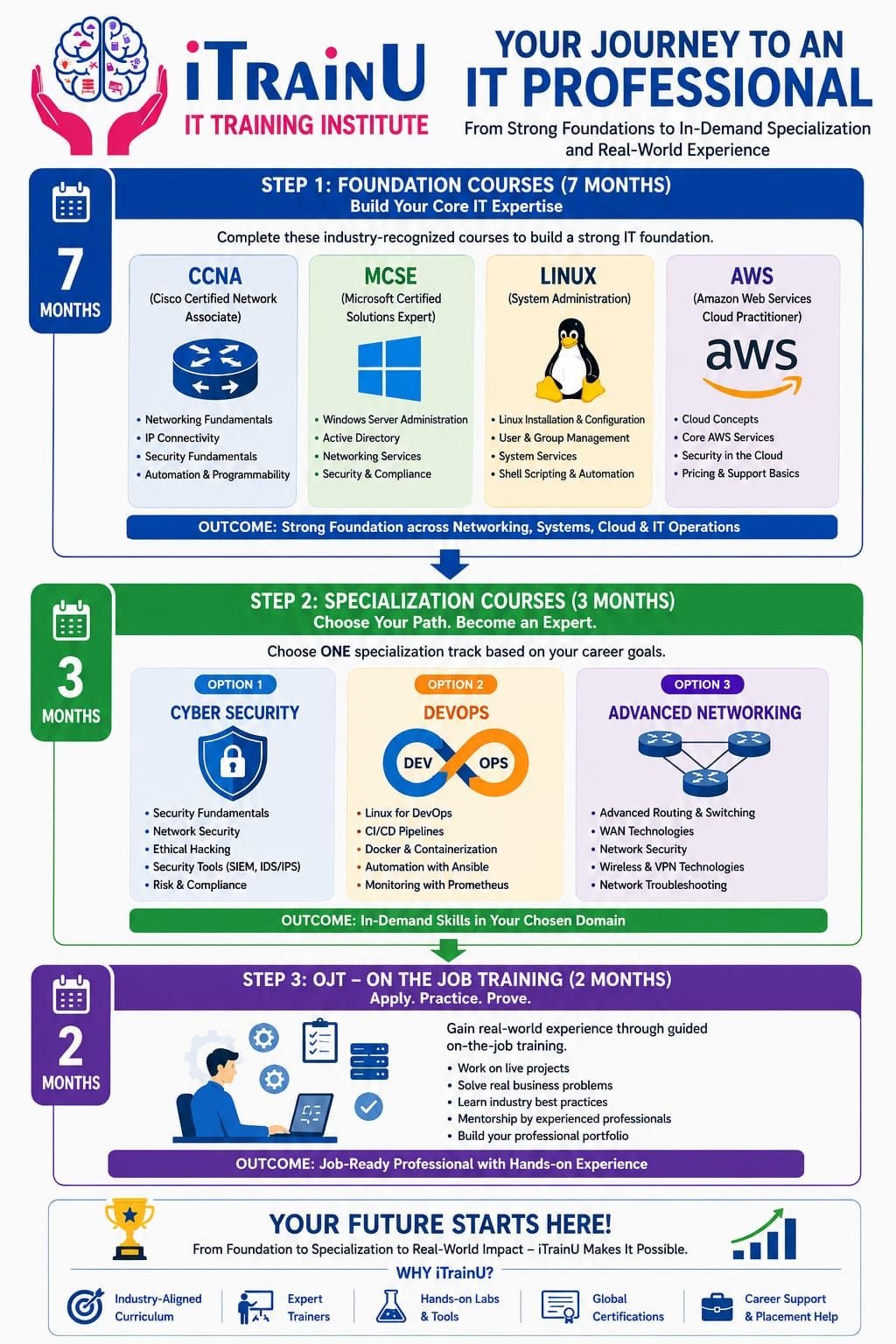
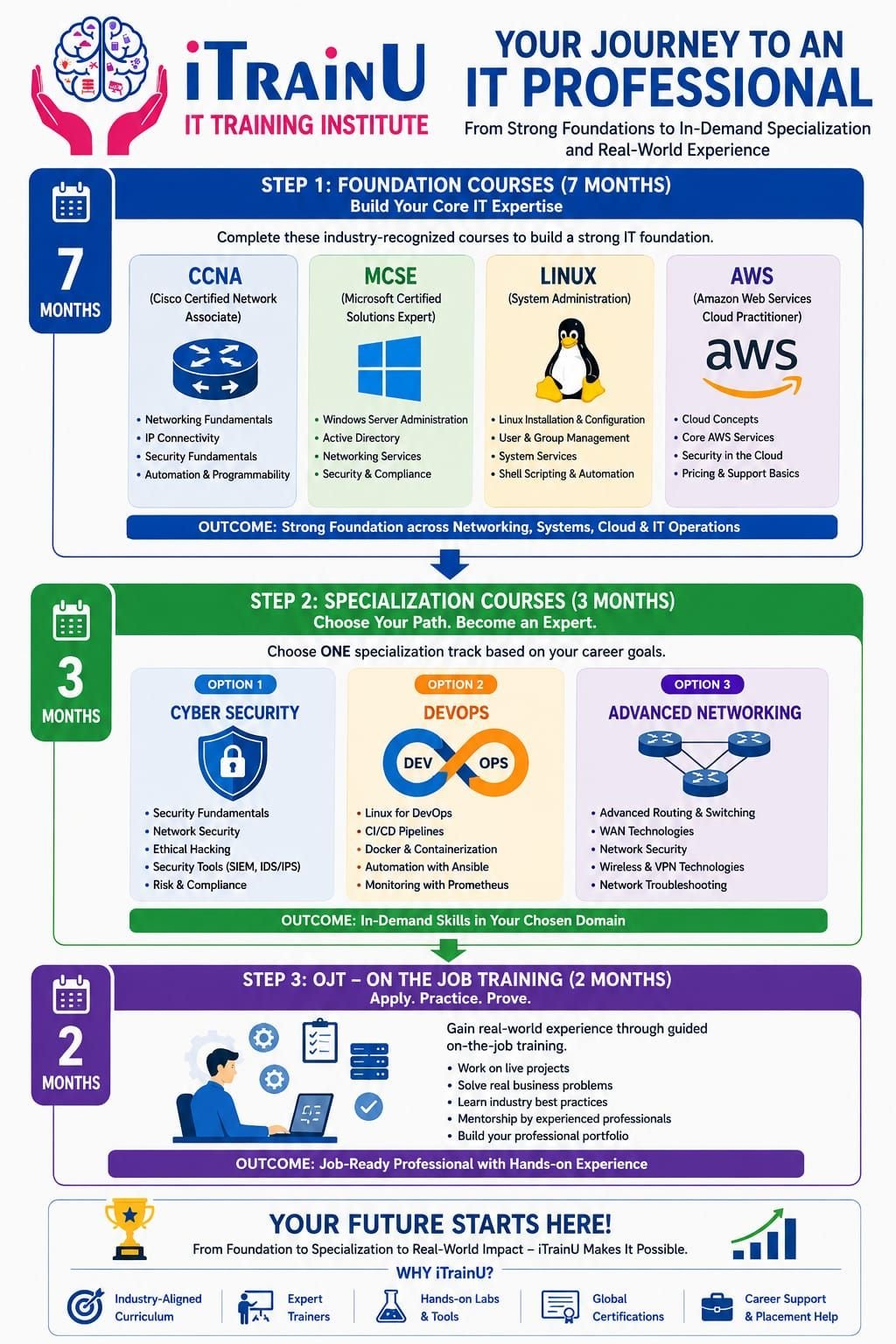
iTrainU’s 12-month career pathway is designed for this purpose. It combines a 7-month Foundation Level, a 3-month Specialization Track, and a 2-month On-the-Job Training program at Fluke Infotech.
Connect with iTrainU:
🌐 Website · ✉️ Email: info@itrainu.in · 💬 WhatsApp · in LinkedIn · ◎ Instagram · ▶ YouTube
Why IT Training Matters in Jamshedpur
IT systems support nearly every modern organization. Industrial companies, hospitals, banks, educational institutions, logistics providers, and service companies need professionals who can maintain reliable and secure technology environments.
A typical IT infrastructure may include:
- Routers, switches, firewalls, and wireless networks
- Windows and Linux servers
- Cloud platforms such as AWS, Azure, or Google Cloud
- User devices, applications, and identity systems
- Security monitoring and backup systems
- Remote offices connected through WAN or SD-WAN
A short theory-only course may not prepare you for these responsibilities. You need to understand how systems work together and practise solving real technical problems.

The iTrainU 12-Month IT Career Roadmap
Phase 1: Seven-Month Foundation Level
The Foundation Level is a structured base for beginners and professionals moving into infrastructure and IT operations.
1. CCNA and Networking
CCNA is a networking foundation that teaches how devices communicate across local and wide-area networks.
You’ll learn:
- OSI and TCP/IP models
- IPv4, IPv6, subnetting, and CIDR
- VLANs, trunking, and inter-VLAN routing
- Static routing and OSPF
- DHCP, NAT, DNS, and access control lists
- Wireless networking and basic security
- Cisco CLI and troubleshooting methods
Why it matters: Networking knowledge is useful in roles such as network engineer, NOC engineer, technical support engineer, system administrator, and cybersecurity analyst.
Explore the iTrainU CCNA Training program.
2. Linux
Linux is an operating system widely used for servers, cloud platforms, containers, and DevOps environments.
You’ll practise:
- File and directory management
- Permissions and ownership
- Users, groups, and processes
- Package management
- Services and system logs
- Networking commands
- Shell basics and server troubleshooting
Example commands you may use in a lab:
# Check the current directory
pwd

# List files with permissions
ls -la

# Check IP addresses
ip address

# View active services
systemctl --type=service --state=running
Why it matters: Linux is a core skill for cloud engineers, DevOps engineers, system administrators, and security professionals.
3. MCSE-Oriented Microsoft Administration
MCSE-oriented learning refers to Microsoft server and infrastructure administration concepts.
Although Microsoft certifications and role-based credentials continue to evolve, the underlying skills remain important. You’ll learn concepts related to:
- Windows Server administration
- Active Directory and user management
- Group Policy
- DNS and DHCP
- File and print services
- System troubleshooting
- Virtualization and enterprise support
Why it matters: Many organizations still operate mixed environments containing Windows servers, Linux servers, cloud services, endpoints, and network appliances.
4. AWS and Cloud Fundamentals
Cloud computing provides on-demand access to computing, storage, networking, and application services.
The foundation stage introduces:
- Cloud service and deployment models
- AWS compute, storage, and networking concepts
- Identity and access management
- Virtual machines and security groups
- Backup, monitoring, and cost awareness
- Basic cloud architecture
You can also compare this foundation with iTrainU’s AWS Training.
5. English and Professional Communication
Technical knowledge is only one part of employability. You’ll also need to explain incidents, write support updates, participate in meetings, and answer interview questions.
The communication component focuses on:
- Technical introductions
- Email and ticket writing
- Interview communication
- Customer-facing explanations
- Professional vocabulary
- Team collaboration
Phase 2: Three-Month Specialization Track
After building your foundation, you can choose a track based on your interests and career goals.
Track A: Cloud and DevOps
DevOps combines development, operations, automation, and continuous delivery practices.
You may work with:
- Git and version control
- Linux administration
- Jenkins and CI/CD pipelines
- Docker containers
- Kubernetes fundamentals
- Ansible and configuration management
- Cloud deployment and monitoring

A simple CI/CD workflow may look like this:
stages:
  - test
  - build
  - deploy

test_app:
  stage: test
  script:
    - echo "Running application tests"

build_app:
  stage: build
  script:
    - echo "Building application"

deploy_app:
  stage: deploy
  script:
    - echo "Deploying to a test environment"
View the iTrainU DevOps Training course.
Track B: Cyber Security and Ethical Hacking
Cybersecurity is the practice of protecting systems, networks, applications, and data from unauthorized access and attacks.
Security is now a business requirement. Companies must protect customer data, employee accounts, cloud workloads, industrial systems, and business applications.
Training may include:
- Security fundamentals
- Footprinting and reconnaissance
- Vulnerability assessment
- Network security
- Ethical hacking concepts
- Web and wireless security
- Cloud security
- Cryptography
- Security reporting and countermeasures
Ethical hacking must always be performed with written permission and inside authorized lab environments.

A cybersecurity career can develop into roles such as:
- Security operations analyst
- Vulnerability analyst
- Penetration testing trainee
- Network security engineer
- Incident response associate
- Cloud security associate
Explore iTrainU Cyber Security Training.
Track C: Advanced Networking with SD-WAN, Aruba, and Fortigate
SD-WAN is a software-managed approach to connecting branches, data centres, and cloud environments.
Aruba skills are relevant to enterprise wireless and network access environments. Fortigate skills focus on firewall administration, security policies, VPNs, and traffic control.
You may learn:
- SD-WAN design concepts
- Branch connectivity
- Aruba switching and wireless fundamentals
- Firewall interfaces and policies
- NAT, VPN, and security rules
- High availability and backup
- Monitoring and troubleshooting
These skills can support higher-value networking roles because they involve business-critical connectivity and security. They don’t guarantee a higher salary, but they can improve your profile when combined with strong fundamentals and practical experience.
Phase 3: Two-Month OJT at Fluke Infotech
The final two months provide workplace exposure through On-the-Job Training at Fluke Infotech.
OJT helps you understand how technical work is performed in a real environment. Depending on your selected track, activities may include:
- Handling support tickets
- Documenting incidents
- Monitoring infrastructure
- Troubleshooting network issues
- Managing user and system access
- Working with cloud or security tools
- Following escalation and change procedures
This stage helps connect classroom learning with professional expectations.
Why Choose Practical Training?
Before Practical Training
You may know definitions but struggle to:
- Configure a VLAN
- Troubleshoot a Linux service
- Create a firewall policy
- Explain a cloud security group
- Build a CI/CD pipeline
- Document a technical incident
After Practical Training
You can build evidence of your skills through:
- Lab configurations
- Troubleshooting exercises
- Projects
- Technical documentation
- Interview explanations
- OJT experience
iTrainU focuses on live sessions, hands-on labs, real-world projects, certified trainers, and placement assistance. You can also review the iTrainU placement support and classroom training options.
Common Mistakes to Avoid
- Learning only from videos: Watching content isn’t the same as configuring systems.
- Skipping networking fundamentals: Cloud and cybersecurity both depend on networking.
- Collecting certificates without projects: Employers often ask what you built or troubleshot.
- Ignoring Linux: Linux is used across cloud and DevOps environments.
- Using security tools without authorization: Practise only in legal, controlled labs.
- Avoiding communication practice: Technical roles require clear explanations and documentation.
- Choosing a course without checking the lab: Ask about hardware, cloud access, assignments, and project work.
Pro Tips for Jamshedpur Learners
- Build a small home lab using virtual machines.
- Maintain a GitHub repository for scripts, notes, and safe projects.
- Practise explaining one technical concept every day.
- Learn the difference between an incident, problem, and change.
- Connect your skills to industrial use cases such as plant networks, remote branches, access control, monitoring, and business continuity.
- Ask the institute for the complete syllabus and batch schedule before enrolling.
- Use iTrainU’s contact page to discuss the right track.
Interview Questions to Practise
- What’s the difference between a switch and a router?
- How does subnetting help network design?
- What happens when you type a website address into a browser?
- How do you check whether a Linux service is running?
- What’s the difference between a security group and a firewall policy?
- What problem does a CI/CD pipeline solve?
- Why are logs important during incident response?
- What’s SD-WAN, and how is it different from traditional WAN?
- What is the purpose of a Fortigate firewall policy?
- How would you troubleshoot a user who can’t access an internal application?
How to Compare IT Institutes in Jamshedpur
Before choosing a provider, compare:
- Curriculum: Does it include CCNA, Linux, Microsoft, cloud, and communication?
- Practical access: Are labs available during and after class?
- Trainer experience: Do instructors explain real project scenarios?
- Specializations: Are DevOps, cybersecurity, SD-WAN, Aruba, and Fortigate included?
- Career support: Are resume reviews, mock interviews, and placement assistance provided?
- Training format: Are weekday, weekend, classroom, or online options available?
You can also review local training listings and technical institutes such as NSTI Jamshedpur while comparing syllabus depth and practical facilities. The right choice should match your career target, learning schedule, and current technical level.
Final Takeaway
If you’re searching for an IT training institute in Jamshedpur, look beyond course duration and certificates. A job-ready pathway should help you build fundamentals, practise technical tasks, select a focused specialization, gain workplace exposure, and prepare for interviews.
iTrainU’s 12-month pathway provides that structure:
- Seven months of Foundation Level: CCNA, Linux, MCSE-oriented Microsoft administration, AWS, and English.
- Three months of Specialization: Cloud and DevOps, Cyber Security and Ethical Hacking, or Advanced Networking with SD-WAN, Aruba, and Fortigate.
- Two months of OJT: Practical workplace exposure at Fluke Infotech.
For enrolment guidance, contact iTrainU through the following channels:
🌐 Website icon: itrainu.in
✉️ Email icon: info@itrainu.in
💬 WhatsApp icon: +91 74155 41833
☎️ Phone icon: +91 76111 75111
in LinkedIn icon: iTrainU Institute
◎ Instagram icon: @itrainu
▶ YouTube icon: iTrainU Institute
FAQs
Is iTrainU’s roadmap suitable for beginners?
Yes. The Foundation Level begins with networking, Linux, Microsoft administration, AWS fundamentals, and communication before moving into specialization.
Which specialization should I choose?
Choose Cloud and DevOps if you enjoy automation and infrastructure. Choose Cyber Security if you’re interested in security analysis and ethical hacking. Choose Advanced Networking if you want to work with enterprise networks, SD-WAN, Aruba, and Fortigate.
Why are CCNA, Linux, and MCSE important together?
CCNA explains connectivity, Linux supports servers and cloud platforms, and Microsoft administration builds enterprise infrastructure knowledge. Together, they provide a broad foundation for IT support and infrastructure roles.
Is cybersecurity a good long-term career option?
Cybersecurity is a long-term field because companies must protect systems, applications, cloud environments, and data. Career growth depends on practical skills, ethical conduct, continuous learning, and relevant experience.
Can working professionals join the program?
Yes. iTrainU provides flexible learning options, including weekday and weekend batches. Confirm the current schedule through the contact team.
#Jamshedpur #Bhopal #Raipur #Mumbai #NaviMumbai #Thane #Noida #Gurugram #Vashi #Andheri #Pithampur #VijayNagarIndore #Satna #Katni #Meghnagar #Mandideep #Dewas #SuperCorridorIndore #Jabalpur #GovindpuraBhopal #Gwalior #SanwerRoadIndore #Nasik #Nagpur #Dhar #Dhule #Pune #Jewar #GiftCity #Ahmedabad #Vadodara #Surat #Silvassa #Dholera #Dahod #Rajkot #Kolkata #Durgapur #Bhubaneshwar #Ranchi #Jamshedpur #Delhi #Hyderabad #Goa #Jaipur #Vapi #Lucknow #GreaterNoida #NewDelhi #Coimbatore #Chennai #Bengaluru #Gachibowli #Ameerpet #Vijayawada #Sholapur #Kolhapur #Gorakhpur #Sagar #Mohali #Chandigarh #Jodhpur #Patna #Gurgaon #Gandhinagar #Dehradun #GeetaBhawanIndore #ElectronicCity #Marathahalli #Jayanagar #Wakad #Hinjewadi #KarveNagar #CyberCity #DLF #HitechCity #Madhapur #Kondapur #Magarpatta #Kharadi #Aundh #Baner #Bandra #Airoli #Sholinganallur #Perungudi #BKC #Parel #Mahim #Borivali #NehruPalace #Satellite #SaltLakeCity #Newtown #Rajarhat #RajivGandhiTechnologyPark #ITPark #Whitefield #Koramangala #Sarjapur #Manipur #Bhadrak #Kurla #Indore #systems #business #technology #design #system #engineering #automation #innovation #productivity #businesssystems #entrepreneur #software #systemsthinking #solutions #softwares #industry #installation #security #businessdevelopment #routing #switching #cisco #firewall #paloalto #fortigate #fortinet #hp #aruba #cabling #datacenter #akcp #indore #Bhopal #India #cio #cto #itmanager #networkengineer #cloud #aws #best #intigrator #IT #vendor #provider #cctv #server #storage #project #itsm #itil