Meta Title: Best IT Training Institute in Nasik | iTrainU 2026 Career Roadmap
Meta Description: Explore iTrainU’s 12-month IT career roadmap for Nashik learners, covering CCNA, Linux, MCSE, AWS, Cloud, DevOps, Cyber Security, SD-WAN, Fortigate and OJT.
Nashik, also written as Nasik, is developing as an important business, manufacturing and industrial location in Maharashtra. Technology teams support companies across Satpur, Ambad, Sinnar, Nashik Road and nearby industrial areas. These businesses need professionals who can manage networks, servers, cloud platforms, cybersecurity systems and enterprise infrastructure.
For students, fresh graduates, career switchers and working professionals in Nashik, the right IT training can create a structured path into technical support, networking, system administration, cloud, DevOps and cybersecurity roles.
The important point is simple: learning one isolated tool may not be enough. You need a foundation in networking, operating systems and cloud before moving into advanced specializations.
🌐 Website icon: Visit iTrainU
✉️ Email icon: info@itrainu.in
💬 WhatsApp icon: Chat with iTrainU
Why IT Training Matters for Nashik Learners
Nashik’s industrial and business ecosystem includes manufacturing companies, logistics operations, hospitals, educational institutions, service providers and growing technology teams. These organizations use:
- Enterprise networks for offices, plants and branches.
- Linux and Windows servers for applications, users and internal services.
- Cloud platforms for storage, computing, backup and software delivery.
- Firewalls and security tools to protect business data.
- SD-WAN to connect branches and improve network performance.
- Monitoring and automation tools to reduce downtime.
Before and after professional training
Before structured training:
- You may understand computer basics but not know how enterprise networks work.
- You may have theoretical knowledge without lab experience.
- You may find it difficult to explain projects during interviews.
- You may apply for jobs without a clear specialization.
After structured training:
- You can troubleshoot network and system issues methodically.
- You can work with Linux, Windows Server and cloud services.
- You can build practical projects for your resume.
- You can select a specialization based on your career goals.
- You can prepare for interviews with technical and communication practice.
The iTrainU 12-Month Career Roadmap
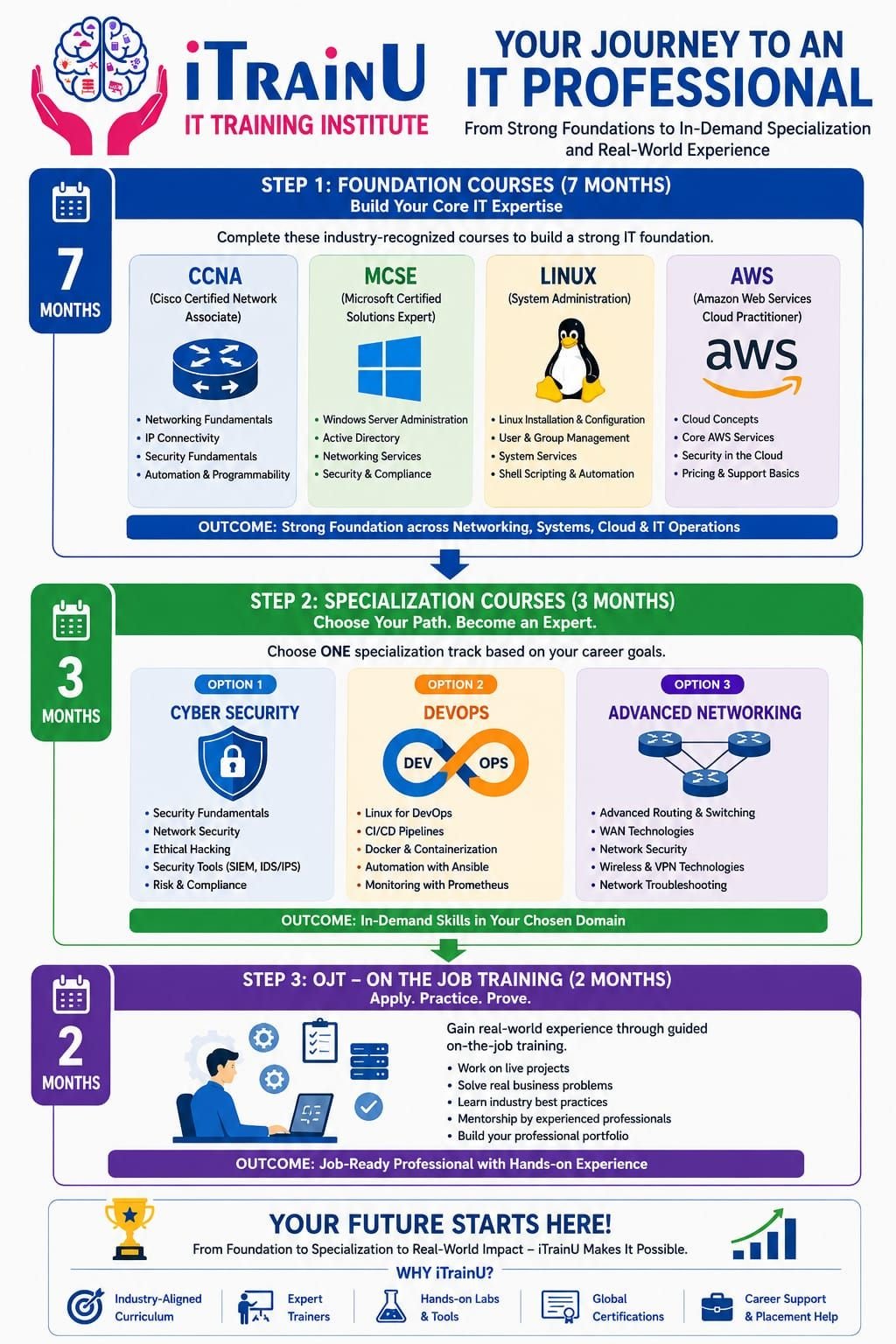
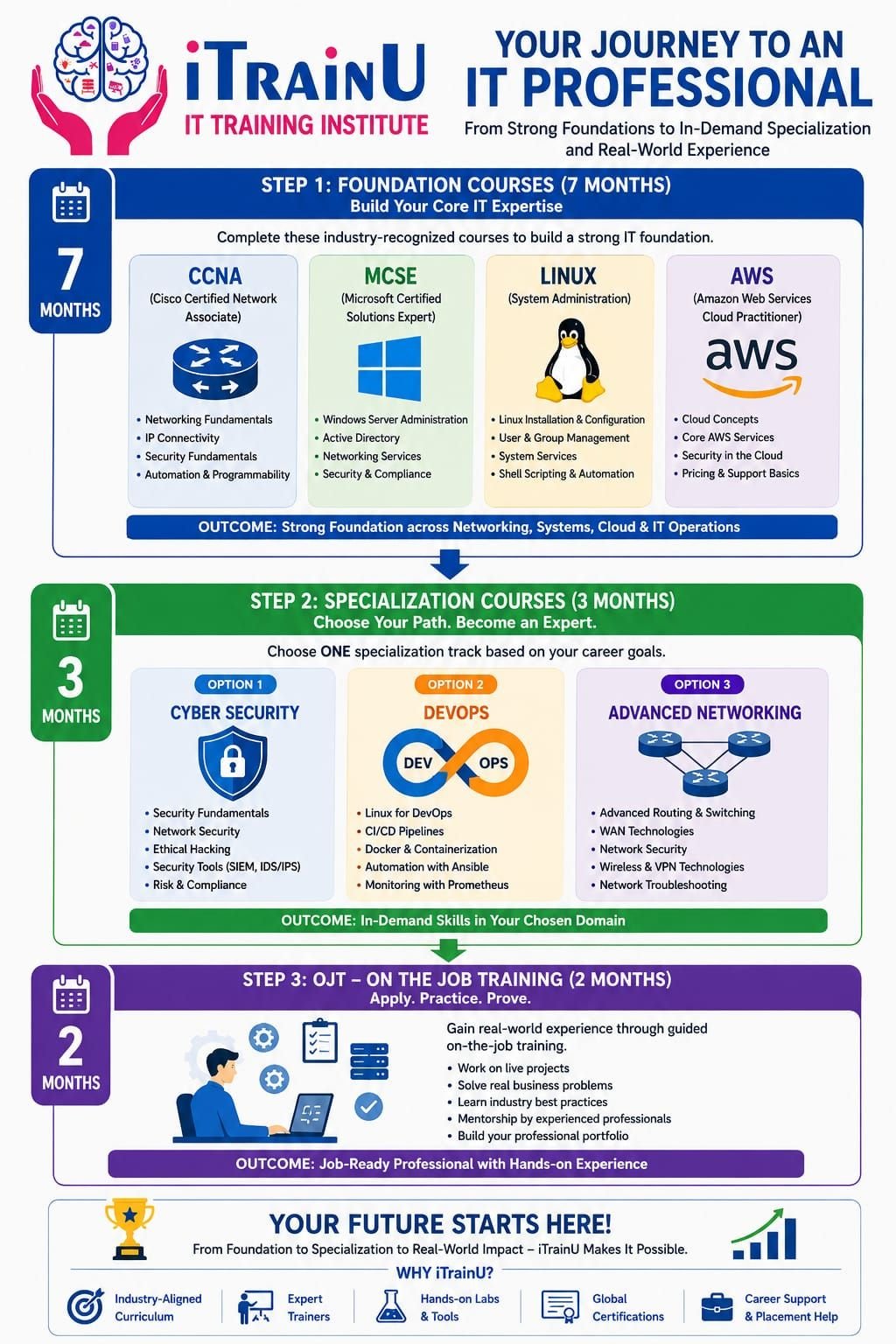
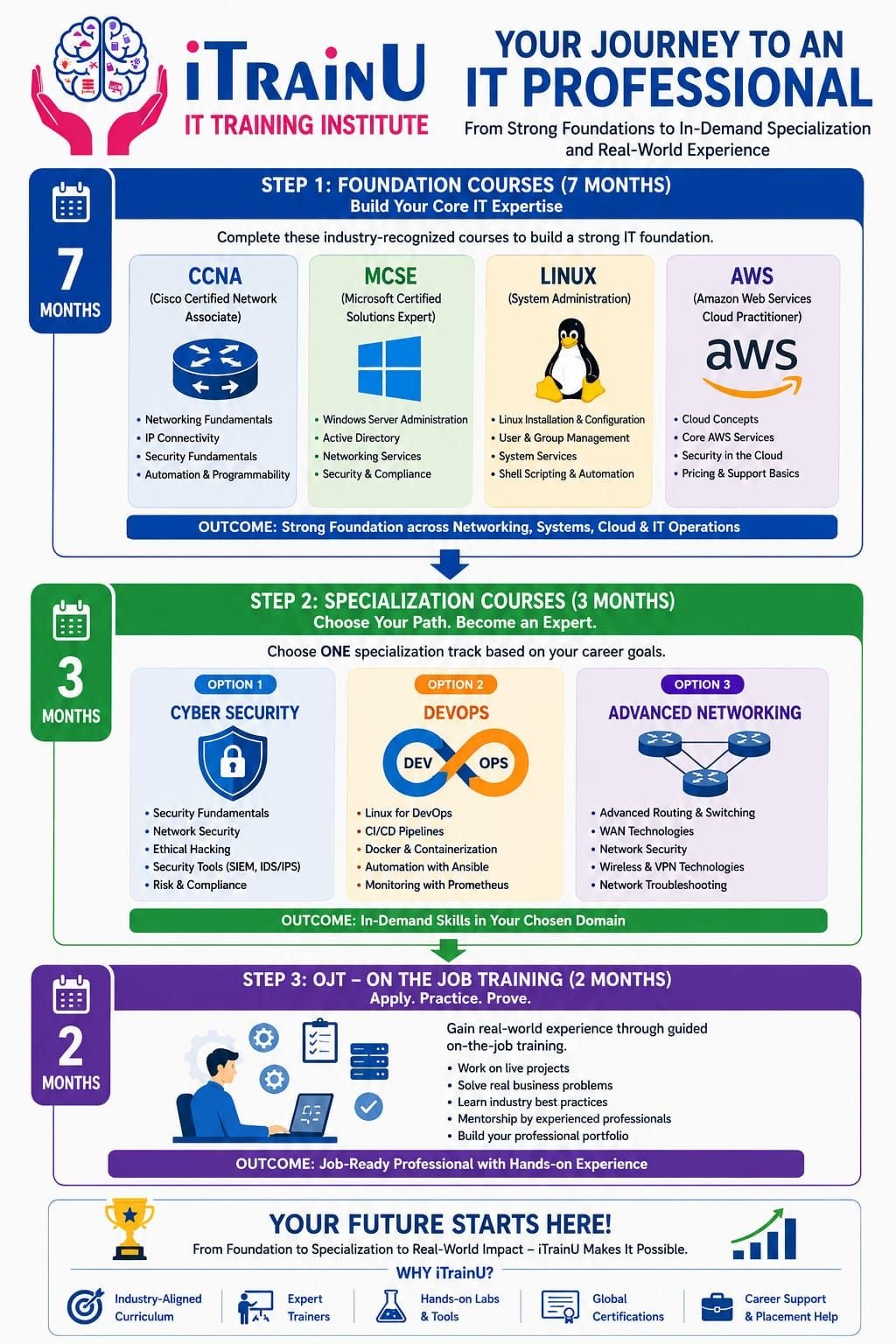
iTrainU’s career pathway is divided into three practical stages:
- Foundation Level – 7 months
- Specialization Track – 3 months
- On-the-Job Training – 2 months
This structure helps you move from basic concepts to job-focused skills.

Stage 1: Seven-Month Foundation Level
The Foundation Level is designed to help you build a broad base across networking, systems, cloud and professional communication.
1. CCNA and networking fundamentals
CCNA is a networking foundation program that teaches how devices communicate across local and wide-area networks.
You learn concepts such as:
- IPv4 and IPv6 addressing.
- Subnetting and route summarization.
- VLANs and trunking.
- Switching and routing.
- DHCP, NAT and DNS.
- Access control lists and basic network security.
- Wireless networking and troubleshooting.
- Introduction to WAN and SD-WAN concepts.
CCNA is important because almost every cloud, server and security role depends on networking knowledge. If you understand traffic flow, IP addressing and routing, you can troubleshoot technical problems more effectively.
2. Linux system administration
Linux is an operating system widely used in servers, cloud platforms, containers and DevOps environments.
Your Linux foundation can include:
- File systems and essential commands.
- Users, groups, permissions and ownership.
- Package installation and updates.
- Processes and services.
- Shell scripting basics.
- Networking commands.
- Log analysis and system troubleshooting.
- Server configuration and automation fundamentals.
For example, a basic Linux troubleshooting task may involve checking whether a service is running:
systemctl status nginx
You might also review recent service messages:
journalctl -u nginx --since "30 minutes ago"
These commands are simple, but they demonstrate the type of practical work expected from junior system administrators and DevOps professionals.
3. MCSE and Windows Server concepts
MCSE is commonly used as a term for Microsoft enterprise server administration skills. Modern Microsoft certification paths have changed over time, but Windows Server knowledge remains useful in enterprise IT.
The foundation may cover:
- Windows Server administration.
- Active Directory concepts.
- User and group management.
- Group Policy.
- DNS and DHCP services.
- File and print services.
- Server security and access control.
- Backup and troubleshooting.
This knowledge is useful in Nashik’s industrial and corporate environments, where employees, devices and applications often depend on centrally managed Windows infrastructure.
4. AWS and cloud fundamentals
AWS is a cloud computing platform that provides on-demand infrastructure and services.
At the foundation level, you can learn:
- Cloud computing concepts.
- Regions and availability zones.
- Identity and Access Management.
- EC2 virtual machines.
- S3 object storage.
- Virtual Private Cloud networking.
- Basic databases and monitoring.
- Cloud security and cost awareness.
Cloud skills make your networking and system administration knowledge more valuable. A professional who understands both on-premises infrastructure and cloud services can support modern hybrid environments.
5. English and workplace communication
Technical knowledge is important, but you also need to explain problems clearly. The foundation pathway can include English and communication development to support:
- Interview introductions.
- Incident reporting.
- Email writing.
- Client communication.
- Technical documentation.
- Team discussions.
Why CCNA, Linux and MCSE Matter for IT Professionals
These three areas create a practical infrastructure foundation.
-
CCNA builds network understanding
- Helps you troubleshoot connectivity.
- Supports future firewall, cloud and SD-WAN learning.
- Prepares you for networking and technical support roles.
-
Linux develops server skills
- Supports cloud, DevOps and cybersecurity work.
- Helps you manage services, logs and permissions.
- Builds command-line confidence.
-
MCSE-related skills support enterprise systems
- Helps you manage users, servers and policies.
- Supports Windows-based organizations.
- Complements Linux and networking knowledge.
Together, they help you understand how users, devices, servers and applications work as one IT environment.
Stage 2: Choose a Three-Month Specialization
After completing the foundation, you can select one focused track.
Cloud and DevOps
This track is suitable if you want to work with automation, cloud infrastructure and software delivery.
Key topics may include:
- Git and version control.
- Jenkins and CI/CD pipelines.
- Docker containers.
- Kubernetes fundamentals.
- Ansible automation.
- Cloud deployment.
- Monitoring and logging.
- Infrastructure troubleshooting.

Cyber Security and Ethical Hacking
Cybersecurity is becoming a long-term requirement for organizations, not an optional department. Companies need to protect customer information, employee systems, cloud resources, applications and connected devices.
The specialization may cover:
- Security fundamentals.
- Vulnerability assessment.
- Network security.
- Ethical hacking methodology.
- Penetration testing concepts.
- SIEM, IDS and IPS fundamentals.
- Web and cloud security.
- Incident response.
- Risk and compliance basics.

Ethical hacking must always be performed with proper authorization. The goal is to identify weaknesses so they can be fixed before attackers exploit them.
Advanced Networking with SD-WAN, Aruba and Fortigate
This track is suitable for learners who want to progress toward network engineering and network security roles.
You can study:
- Advanced routing and switching.
- WAN architecture.
- SD-WAN design concepts.
- Aruba networking and wireless infrastructure.
- Fortigate firewall administration.
- Firewall policies and NAT.
- VPN configuration concepts.
- High availability and troubleshooting.
- Network monitoring and security controls.
SD-WAN uses software-based policies to manage connections across branches, internet links and private networks. It can improve visibility, application performance and centralized control.
Fortigate skills are valuable because firewall professionals work directly with access policies, VPNs, traffic inspection and network protection. Combining CCNA, SD-WAN and Fortigate can help you target more specialized infrastructure roles.
Stage 3: Two-Month OJT at Fluke Infotech
The final stage is a two-month On-the-Job Training period at Fluke Infotech. It is designed to help you apply your learning in a professional environment.
During OJT, you can work on:
- Guided technical tasks.
- Live or simulated business scenarios.
- Troubleshooting activities.
- Documentation and reporting.
- Team-based problem solving.
- Professional communication.
- Resume and portfolio development.
This stage helps connect classroom learning with workplace expectations. Your exact activities and availability should be confirmed with the iTrainU admissions team before enrollment.
How iTrainU Supports Job Readiness
iTrainU combines live sessions, practical labs, projects and trainer support. The institute also provides placement assistance that may include:
- Resume preparation.
- Technical interview practice.
- Mock interviews.
- Soft-skill development.
- Career guidance.
- Job opportunity coordination.
- Mentor support.

Placement assistance can improve your preparation, but your final career outcome will also depend on attendance, lab practice, project quality, interview performance and continuous learning.
Who Should Join This Roadmap?
This 12-month pathway can suit:
- Students studying computer science or related subjects.
- Fresh graduates seeking an entry-level IT role.
- Non-IT graduates planning a career transition.
- Working professionals in Satpur, Ambad or Sinnar who want to upskill.
- Technical support professionals moving toward networking or cloud.
- Network engineers preparing for security and SD-WAN roles.
- System administrators moving toward DevOps or cloud.
How to Choose the Right IT Training Program in Nashik
Before joining any course, ask these questions:
- Does the course include daily or regular lab practice?
- Are trainers experienced in real projects?
- Will you complete practical assignments?
- Are CCNA, Linux, MCSE and AWS taught in a connected sequence?
- Which specialization is best for your current background?
- Is the OJT structure clearly explained?
- What placement assistance is included?
- Are weekday and weekend batches available?
- Can you attend online or classroom sessions based on your schedule?
Contact iTrainU for Nashik Enquiries

For batch availability, course fees, online or classroom options and the Nashik learning plan, contact iTrainU directly.
🌐 Website icon: https://www.itrainu.in
[✉️ Email icon: info@itrainu.in]
[💬 WhatsApp icon: +91 7415 541 833
[☎️ Phone icon: +91 76111 75111
[🔗 LinkedIn icon: iTrainU Institute]
[📸 Instagram icon: @itrainu]
[▶️ YouTube icon: iTrainU Institute]
You can also explore the CCNA training course, DevOps training course, Cyber Security training course and placement assistance program.
Final Summary
The best IT training pathway for Nashik learners should build skills in the correct order. Start with CCNA, Linux, MCSE, AWS and communication, then choose a focused specialization in Cloud and DevOps, Cyber Security and Ethical Hacking, or Advanced Networking with SD-WAN, Aruba and Fortigate.
iTrainU’s 12-month structure adds a two-month OJT at Fluke Infotech to help you gain practical exposure. For learners in Nashik and the Satpur, Ambad and Sinnar industrial belts, this foundation-to-specialization approach can provide a clear direction for building a long-term IT career.
#Bhopal #Raipur #Mumbai #NaviMumbai #Thane #Noida #Gurugram #Vashi #Andheri #Pithampur #VijayNagarIndore #Satna #Katni #Meghnagar #Mandideep #Dewas #SuperCorridorIndore #Jabalpur #GovindpuraBhopal #Gwalior #SanwerRoadIndore #Nasik #Nagpur #Dhar #Dhule #Pune #Jewar #GiftCity #Ahmedabad #Vadodara #Surat #Silvassa #Dholera #Dahod #Rajkot #Kolkata #Durgapur #Bhubaneshwar #Ranchi #Jamshedpur #Delhi #Hyderabad #Goa #Jaipur #Vapi #Lucknow #GreaterNoida #NewDelhi #Coimbatore #Chennai #Bengaluru #Gachibowli #Ameerpet #Vijayawada #Sholapur #Kolhapur #Gorakhpur #Sagar #Mohali #Chandigarh #Jodhpur #Patna #Gurgaon #Gandhinagar #Dehradun #GeetaBhawanIndore #ElectronicCity #Marathahalli #Jayanagar #Wakad #Hinjewadi #KarveNagar #CyberCity #DLF #HitechCity #Madhapur #Kondapur #Magarpatta #Kharadi #Aundh #Baner #Bandra #Airoli #Sholinganallur #Perungudi #BKC #Parel #Mahim #Borivali #NehruPalace #Satellite #SaltLakeCity #Newtown #Rajarhat #RajivGandhiTechnologyPark #ITPark #Whitefield #Koramangala #Sarjapur #Manipur #Bhadrak #Kurla #Indore #systems #business #technology #design #system #engineering #automation #innovation #productivity #businesssystems #entrepreneur #software #systemsthinking #solutions #softwares #industry #installation #security #businessdevelopment #routing #switching #cisco #firewall #paloalto #fortigate #fortinet #hp #aruba #cabling #datacenter #akcp #indore #Bhopal #India #cio #cto #itmanager #networkengineer #cloud #aws #best #intigrator #IT #vendor #provider #cctv #server #storage #project #itsm #itil