Meta Title: Best IT Training Institute in Vadodara | iTrainU 2026 Roadmap
Meta Description: Explore iTrainU’s 12-month IT career roadmap for Vadodara learners, covering CCNA, Linux, MCSE, AWS, Cloud, DevOps, Cyber Security, SD-WAN, Aruba, Fortigate and OJT.

Why IT Training Matters in Vadodara in 2026
Vadodara is an important education, engineering and industrial centre in Gujarat. Students and professionals in Makarpura, Savli, Padra, Manjalpur, Gotri and nearby areas increasingly work with manufacturing companies, engineering organisations, service providers and technology teams.
These workplaces depend on reliable networks, secure systems, cloud platforms and continuous technical support. This creates opportunities for people who can combine networking, Linux, Microsoft technologies, cloud computing and cyber security.
However, completing a basic computer course isn’t enough for most technical roles. You need a structured learning path that connects theory with practical labs, projects, communication skills and workplace experience.
That’s where a planned 12-month IT career roadmap can help.
Connect with iTrainU:
- 🌐 Website icon – Visit iTrainU
- ✉️ Email icon – Send an enquiry
- 💬 WhatsApp icon – Chat with the training team
- 🔗 LinkedIn icon – Follow iTrainU
What Makes a Good IT Training Institute in Vadodara?
A good IT training institute is more than a place where you watch presentations. It should help you build skills that can be used in an actual support, network, cloud or security environment.
Before selecting a course, check whether the institute provides:
-
Industry-aligned curriculum
- CCNA-level networking
- Linux system administration
- Microsoft server concepts
- AWS and cloud fundamentals
- DevOps tools and automation
- Cyber Security and Ethical Hacking
- SD-WAN, Aruba and Fortigate exposure
-
Hands-on lab practice
- Cisco routing and switching labs
- Linux and Windows virtual machines
- AWS cloud exercises
- Firewall and VPN configuration
- Troubleshooting scenarios
- Project-based assignments
-
Career support
- Resume preparation
- Interview practice
- Mock interviews
- Communication and English support
- Job role guidance
- Placement assistance
iTrainU’s training model is designed around live sessions, practical labs, real-world projects and guidance from experienced trainers. Students from Vadodara can use online or available classroom options and should confirm current batch schedules before enrolment.
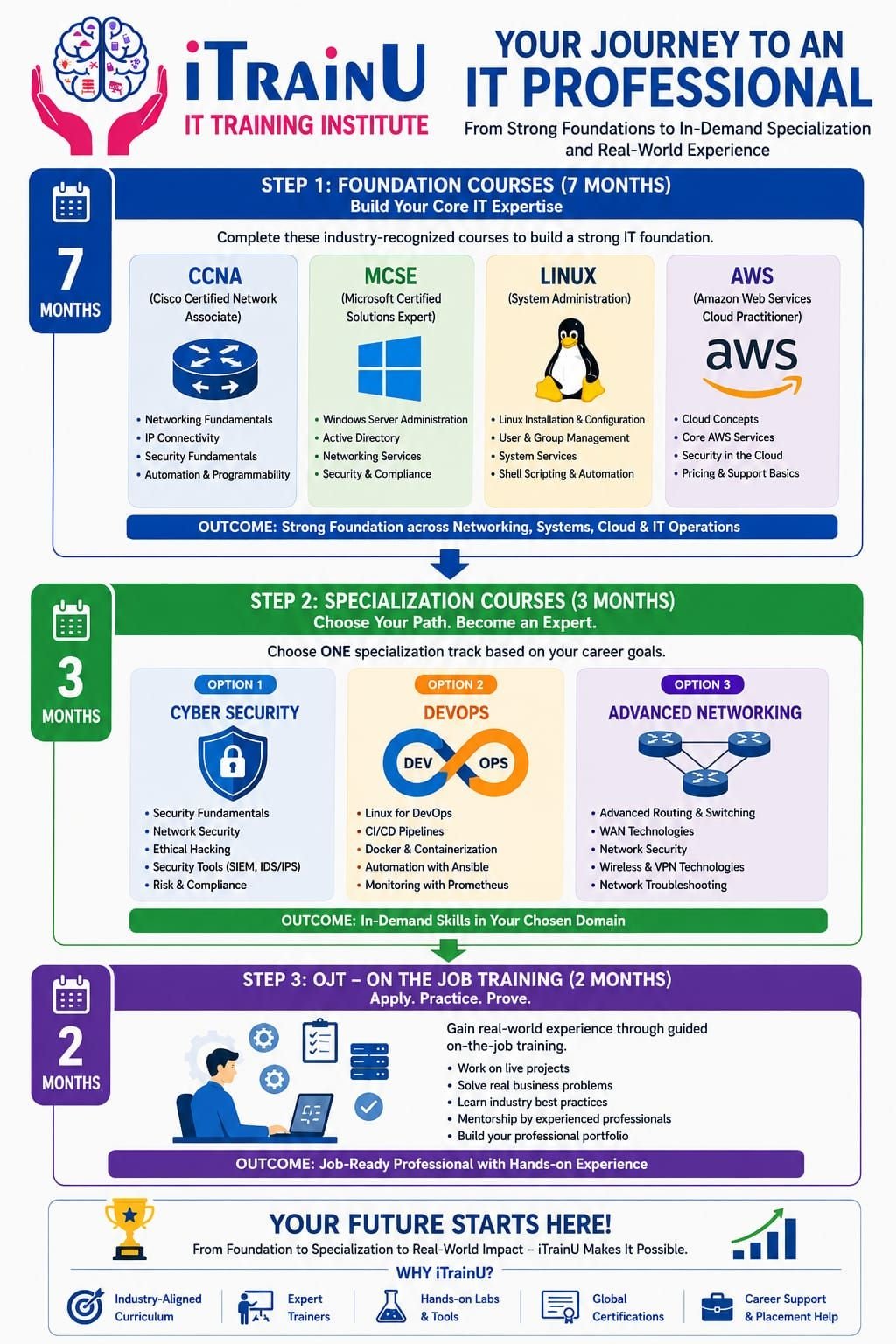
iTrainU’s 12-Month IT Career Roadmap
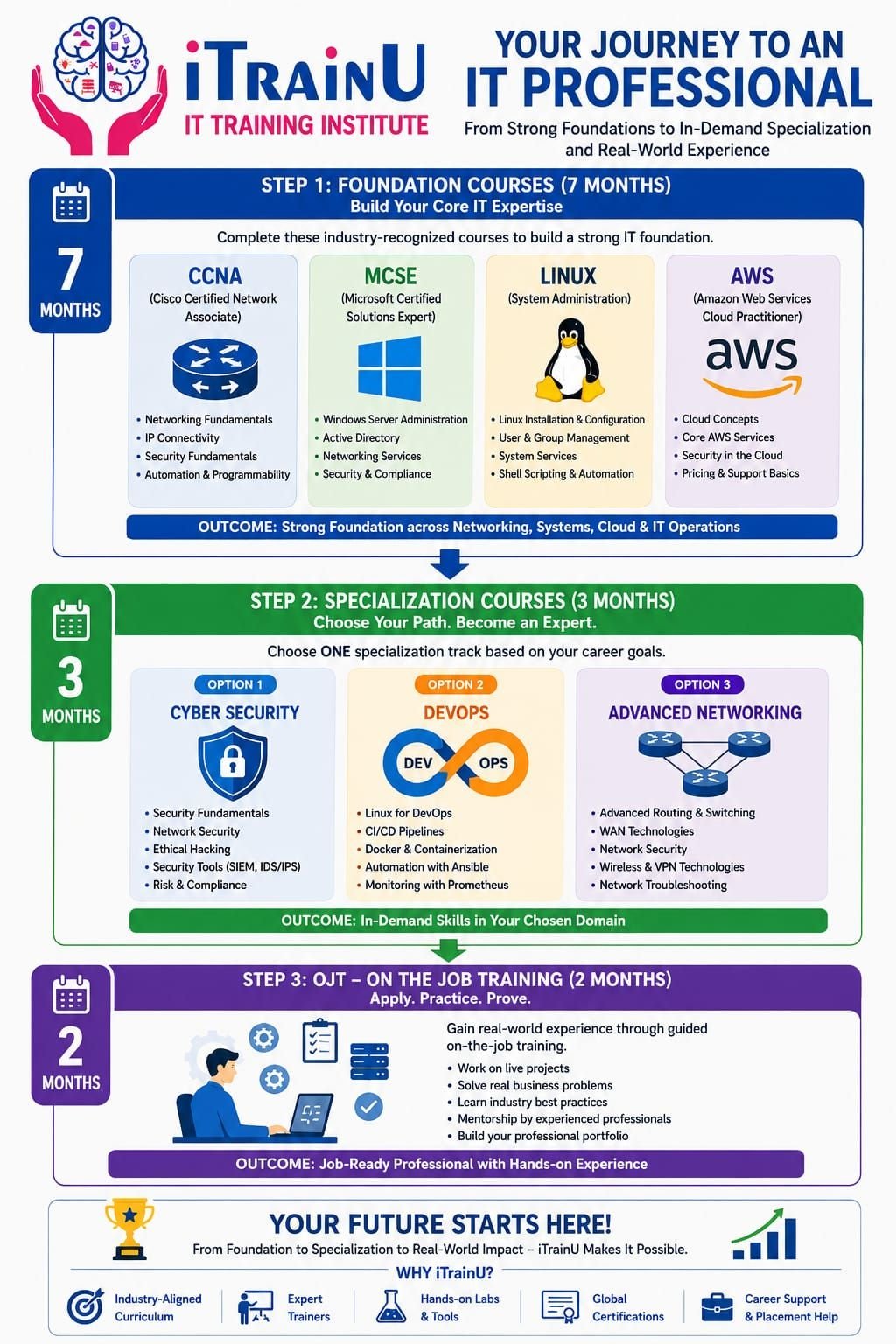
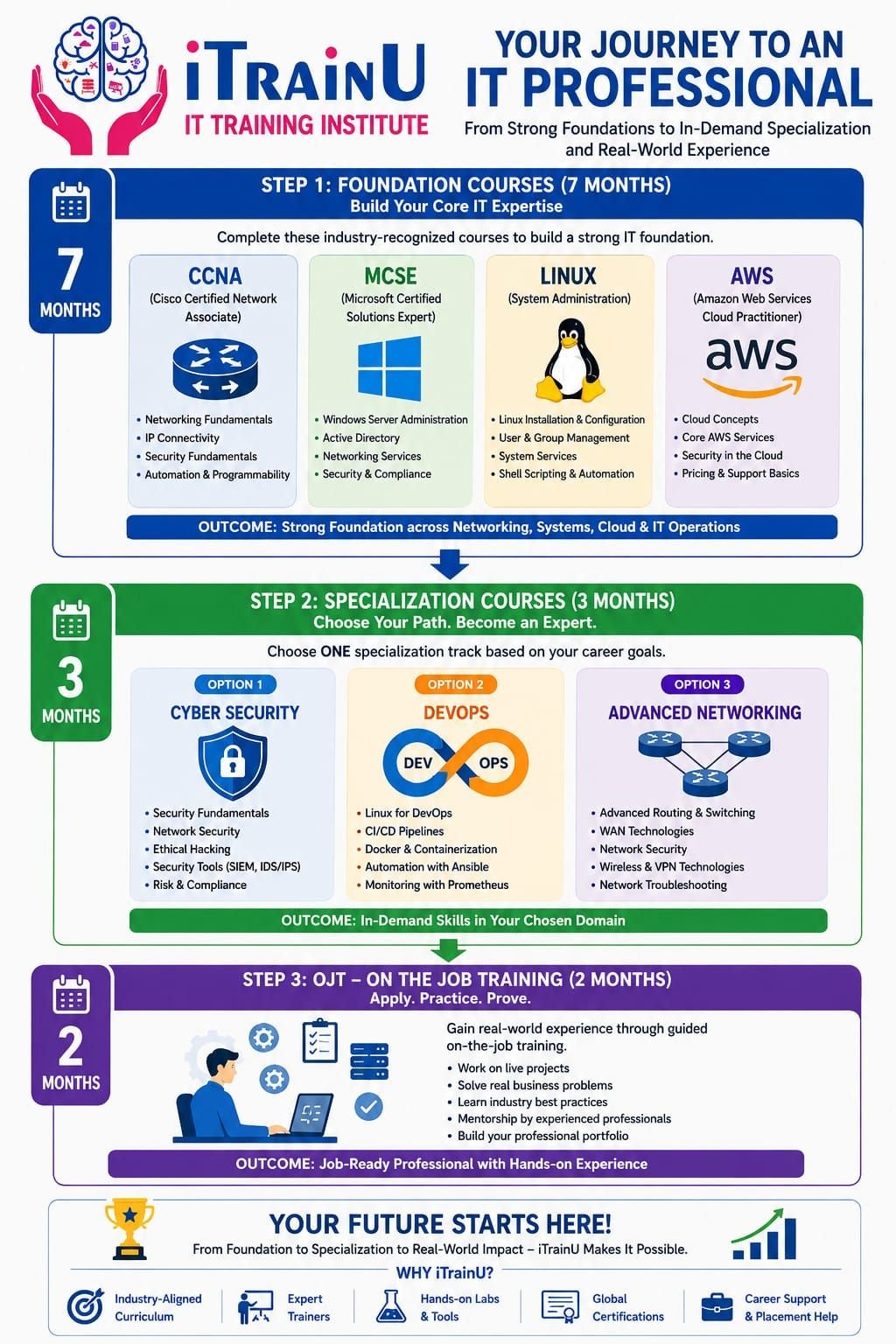
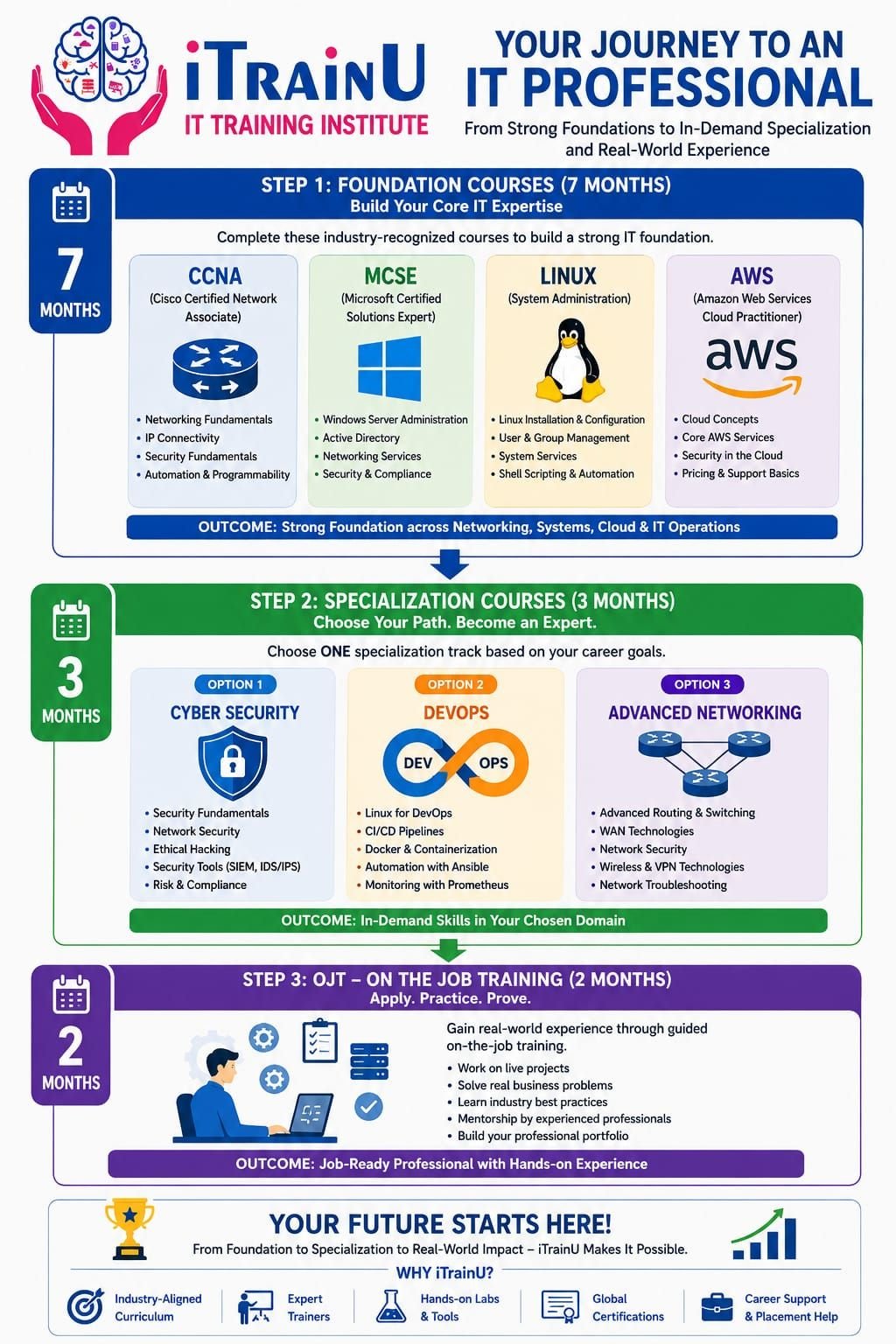
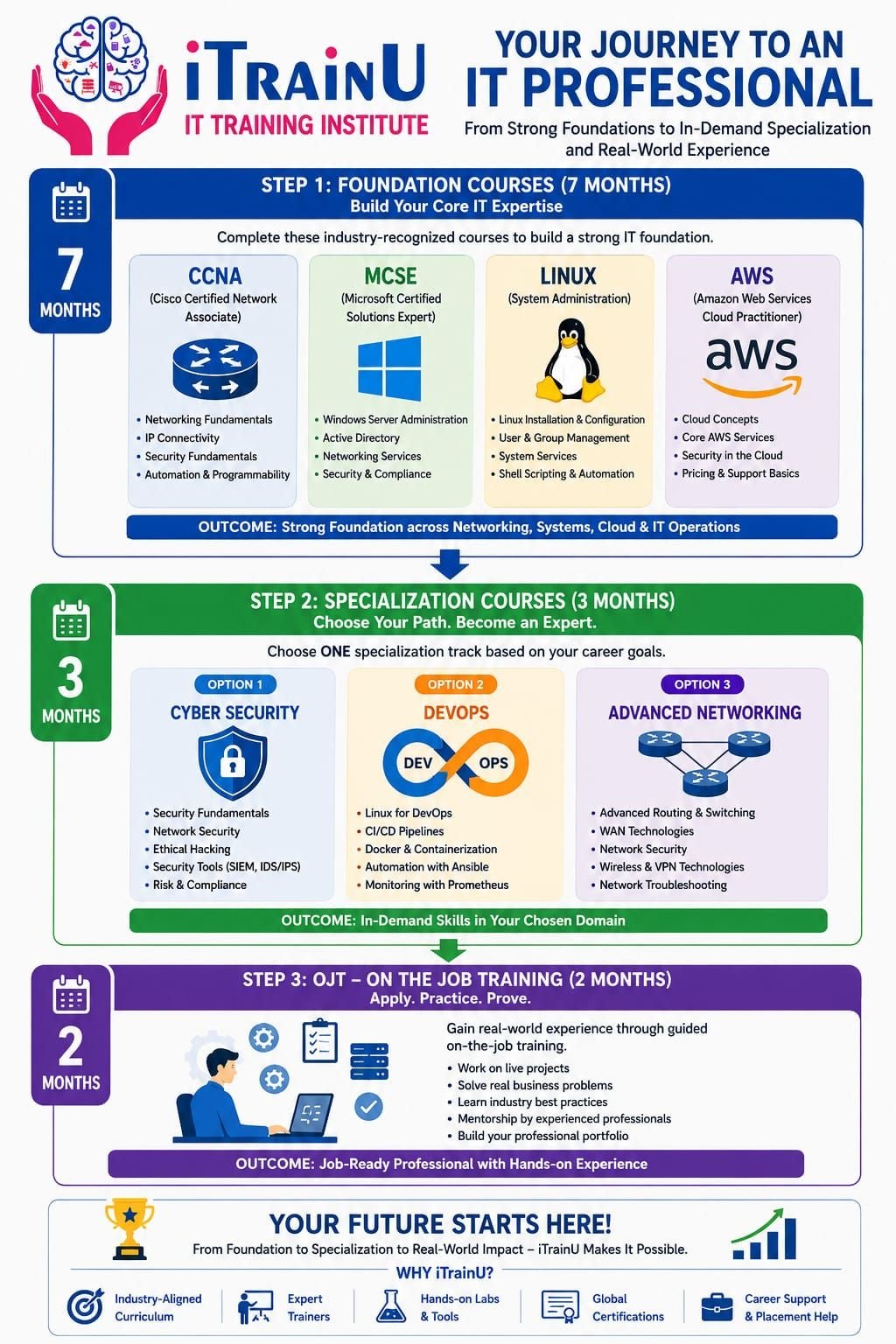
The iTrainU pathway is divided into three stages:
- 7 months: Foundation Level
- 3 months: Specialization Track
- 2 months: On-the-Job Training at Fluke Infotech
This structure helps you learn the basics first, select a focused career direction and then apply your knowledge in a professional environment.
Stage 1: Seven-Month Foundation Level
The foundation stage is suitable for beginners, fresh graduates, career switchers and professionals who want to strengthen their infrastructure knowledge.

1. CCNA and Networking
CCNA is a networking foundation that teaches how devices communicate across local and wide-area networks.
You learn topics such as:
- IP addressing and subnetting
- Routing and switching
- VLANs and trunking
- OSPF and static routing
- DHCP, DNS and NAT
- Access control lists
- Wireless networking
- Basic network security
- Troubleshooting using the Cisco CLI
Networking knowledge is useful in Vadodara’s industrial belts because offices, plants and service centres depend on stable connectivity between users, servers, applications and remote locations.
Read more about iTrainU CCNA Training.
2. Linux Administration
Linux is an operating system widely used for servers, cloud platforms, DevOps tools and security systems.
Linux training typically includes:
- File systems and permissions
- Users and groups
- Package management
- Processes and services
- Network configuration
- Shell commands
- Log analysis
- Basic scripting
- Server administration
For example, a junior Linux administrator may investigate a service failure using commands such as:
systemctl status nginx
journalctl -u nginx --since "30 minutes ago"
df -h
free -m
These commands help check service status, review logs, monitor disk usage and inspect memory.
You can also read What is Linux? for a beginner-friendly explanation.
3. MCSE and Microsoft Administration Concepts
MCSE-style training builds knowledge of Windows Server and enterprise administration.
Although Microsoft has moved toward role-based certifications, the underlying administration skills remain useful. You can learn:
- Active Directory concepts
- DNS and DHCP
- Group Policy
- Windows Server management
- File and print services
- User and computer administration
- Access control
- Basic server security
These skills are useful for help desk, system administrator and infrastructure support roles.
4. AWS and Cloud Fundamentals
Cloud computing provides on-demand access to computing, storage, networking and application services.
The AWS foundation can introduce you to:
- EC2 virtual servers
- S3 object storage
- IAM access management
- VPC networking
- Security groups
- Cloud monitoring
- Pricing and cost awareness
- Shared responsibility
The goal isn’t just to memorise service names. You should understand how a business application is deployed, secured, monitored and supported in the cloud.
Why CCNA, Linux and MCSE Matter for IT Professionals
These technologies form a practical infrastructure base.
-
CCNA develops network thinking
- You learn how traffic moves.
- You can troubleshoot connectivity.
- You understand routing, switching and security controls.
-
Linux supports modern technology
- Many cloud servers run Linux.
- DevOps tools depend heavily on Linux.
- Cyber Security labs often use Linux-based systems.
-
MCSE concepts support enterprise operations
- Businesses still use identity services, Windows servers and policies.
- System administrators need to manage users, permissions and devices.
- Hybrid environments often combine Microsoft infrastructure with cloud services.
Learning only one area can limit your understanding. Learning all three gives you a stronger base for networking, cloud, DevOps and cyber security roles.
Stage 2: Choose a Three-Month Specialization Track
After building your foundation, you can select one of three tracks.
Track A: Cloud and DevOps
DevOps combines development and operations through collaboration, automation and continuous delivery.
You may work with:
- Git
- Jenkins
- Docker
- Kubernetes
- Ansible
- Maven
- Monitoring tools
- Linux automation
- CI/CD pipelines
A practical project could involve creating a Git repository, building an application with Jenkins, packaging it in Docker and deploying it to a test environment.
Explore iTrainU DevOps Training.
Track B: Cyber Security and Ethical Hacking
Cyber Security protects systems, applications, networks and data from unauthorised access or disruption.
Companies in manufacturing, finance, healthcare, education and technology must protect sensitive data and operational systems. This makes cyber security a long-term career area.
Topics can include:
- Security fundamentals
- Ethical hacking concepts
- Network scanning
- Vulnerability assessment
- Web and application security
- SIEM, IDS and IPS concepts
- Incident response
- Cryptography
- Cloud security
- Penetration testing methodology

Ethical hacking must always be performed with written permission and within a controlled lab. Unauthorised testing can damage systems and create legal problems.
Read about iTrainU Cyber Security Training.
Track C: Advanced Networking
Advanced Networking focuses on enterprise connectivity, security and wide-area network management.
This track may cover:
- Advanced routing and switching
- WAN technologies
- SD-WAN
- Aruba networking
- Wireless infrastructure
- VPNs
- Firewall policies
- Fortigate administration
- Network monitoring
- Troubleshooting and documentation
Why SD-WAN and Fortigate Skills Can Lead to Higher-Paid Roles
SD-WAN is a software-defined approach to managing wide-area connectivity. It helps organisations control traffic across multiple links, such as broadband, leased lines and 4G or 5G connections.
Fortigate is a security platform used for firewall, VPN, threat prevention and network protection functions.
These skills are valuable because they combine networking and security. Employers often prefer professionals who can:
- Configure secure connectivity
- Create firewall policies
- Manage VPN tunnels
- Analyse traffic and logs
- Support branch offices
- Troubleshoot WAN performance
- Apply segmentation and access controls
Specialised skills don’t automatically guarantee a higher salary. Pay depends on your experience, projects, certifications, communication ability and the employer. However, SD-WAN and Fortigate can help you move beyond basic support roles when combined with CCNA, Linux and security knowledge.
Stage 3: Two-Month OJT at Fluke Infotech
On-the-job training is supervised workplace learning where you apply technical knowledge to realistic tasks.
During the two-month OJT at Fluke Infotech, the focus is on developing professional habits such as:
- Following tickets and escalation procedures
- Documenting changes
- Troubleshooting step by step
- Communicating with users and teams
- Applying security procedures
- Working with tools and checklists
- Understanding service-level expectations
For a Vadodara learner, this stage can help connect classroom knowledge with the expectations of IT support, NOC, system administration, cloud and security teams.
How to Prepare for IT Jobs in Vadodara
Use the following plan throughout the 12 months:
-
Build a project portfolio
- Create a small routed network.
- Deploy a Linux web server.
- Configure an AWS test environment.
- Build a basic CI/CD pipeline.
- Document a firewall or VPN lab.
-
Improve communication
- Practise explaining technical problems in simple English.
- Learn how to write clear ticket updates.
- Prepare a one-minute professional introduction.
-
Understand local work environments
- Study how industrial offices use networks and servers.
- Learn the difference between IT and operational technology.
- Understand backup, access control and downtime risks.
-
Prepare for interviews
- Revise subnetting and troubleshooting.
- Practise Linux commands.
- Explain cloud security groups and IAM.
- Understand firewall policies and VPNs.
- Be ready to discuss your projects.
Common Mistakes to Avoid
- Choosing a course only because it has a low fee
- Watching videos without completing labs
- Memorising commands without understanding their purpose
- Ignoring English and interview preparation
- Listing tools on your resume without project evidence
- Attempting cyber security activities without permission
- Expecting placement assistance to replace personal preparation
- Learning too many technologies without completing one practical track
Pro Tips for Vadodara Learners
- Visit or request a lab demonstration before enrolling.
- Ask how many hours are allocated to practical work.
- Confirm whether SD-WAN and Fortigate are taught through labs.
- Keep a troubleshooting diary with symptoms, causes and solutions.
- Use Makarpura, Savli and Padra as context when creating industrial IT scenarios.
- Build one complete project instead of collecting many unfinished certificates.
- Review your progress every month with your trainer or mentor.
For course guidance, you can contact iTrainU through:
- 🌐 Website icon – Explore IT courses
- 💬 WhatsApp icon – Ask about Vadodara batches
- ✉️ Email icon – Contact iTrainU
- 📞 Phone icon – Call +91 76111 75111
- 📸 Instagram icon – Follow learning updates
- ▶️ YouTube icon – Watch training videos
Conclusion
The best IT training institute in Vadodara should help you move from basic concepts to practical job skills. iTrainU’s 12-month roadmap provides a structured sequence: seven months of CCNA, Linux, MCSE, AWS and English foundation; three months of specialization; and two months of OJT at Fluke Infotech.
For students and professionals in Vadodara, this pathway can create a strong base for careers in networking, system administration, cloud, DevOps and cyber security. Your results will depend on consistent lab practice, project work, communication skills and interview preparation.
FAQs
Is iTrainU suitable for beginners in Vadodara?
Yes. The foundation stage is designed to introduce networking, operating systems, cloud and communication skills in a structured order. Beginners should confirm the current delivery mode and batch timing before joining.
Why should I learn CCNA before Cyber Security?
Networking knowledge helps you understand traffic, protocols, ports, routing, segmentation and access controls. These concepts are important for security monitoring and ethical hacking.
Is Linux necessary for DevOps and Cloud?
Linux is highly useful for DevOps and cloud roles because many servers, containers and automation tools run on Linux-based systems.
Is MCSE still useful in 2026?
The MCSE brand is legacy, but Windows Server, Active Directory, DNS, DHCP and Group Policy skills remain relevant. You should also explore current Microsoft role-based certifications.
Can SD-WAN and Fortigate help my career?
They can help you develop specialised networking and security skills. Your career growth will also depend on hands-on practice, troubleshooting ability, certifications, experience and communication.
Does iTrainU provide placement support?
iTrainU provides career and placement assistance that may include resume guidance, interview preparation, mock interviews and job support. Placement depends on your skills, performance and employer requirements.
#Bhopal #Raipur #Mumbai #NaviMumbai #Thane #Noida #Gurugram #Vashi #Andheri #Pithampur #VijayNagarIndore #Satna #Katni #Meghnagar #Mandideep #Dewas #SuperCorridorIndore #Jabalpur #GovindpuraBhopal #Gwalior #SanwerRoadIndore #Nasik #Nagpur #Dhar #Dhule #Pune #Jewar #GiftCity #Ahmedabad #Vadodara #Surat #Silvassa #Dholera #Dahod #Rajkot #Kolkata #Durgapur #Bhubaneshwar #Ranchi #Jamshedpur #Delhi #Hyderabad #Goa #Jaipur #Vapi #Lucknow #GreaterNoida #NewDelhi #Coimbatore #Chennai #Bengaluru #Gachibowli #Ameerpet #Vijayawada #Sholapur #Kolhapur #Gorakhpur #Sagar #Mohali #Chandigarh #Jodhpur #Patna #Gurgaon #Gandhinagar #Dehradun #GeetaBhawanIndore #ElectronicCity #Marathahalli #Jayanagar #Wakad #Hinjewadi #KarveNagar #CyberCity #DLF #HitechCity #Madhapur #Kondapur #Magarpatta #Kharadi #Aundh #Baner #Bandra #Airoli #Sholinganallur #Perungudi #BKC #Parel #Mahim #Borivali #NehruPalace #Satellite #SaltLakeCity #Newtown #Rajarhat #RajivGandhiTechnologyPark #ITPark #Whitefield #Koramangala #Sarjapur #Manipur #Bhadrak #Kurla #Indore #systems #business #technology #design #system #engineering #automation #innovation #productivity #businesssystems #entrepreneur #software #systemsthinking #solutions #softwares #industry #installation #security #businessdevelopment #routing #switching #cisco #firewall #paloalto #fortigate #fortinet #hp #aruba #cabling #datacenter #akcp #indore #Bhopal #India #cio #cto #itmanager #networkengineer #cloud #aws #best #intigrator #IT #vendor #provider #cctv #server #storage #project #itsm #itil