Vapi is part of the important Gujarat–Silvassa industrial belt, with strong activity across chemical manufacturing, pharmaceuticals, engineering, logistics, production, and industrial services. These businesses need reliable networks, secure systems, cloud platforms, Linux servers, firewalls, and skilled IT support teams.
For students, fresh graduates, and working professionals in Vapi, the challenge isn’t only finding an IT course. It’s choosing a learning path that builds practical skills in the correct order.
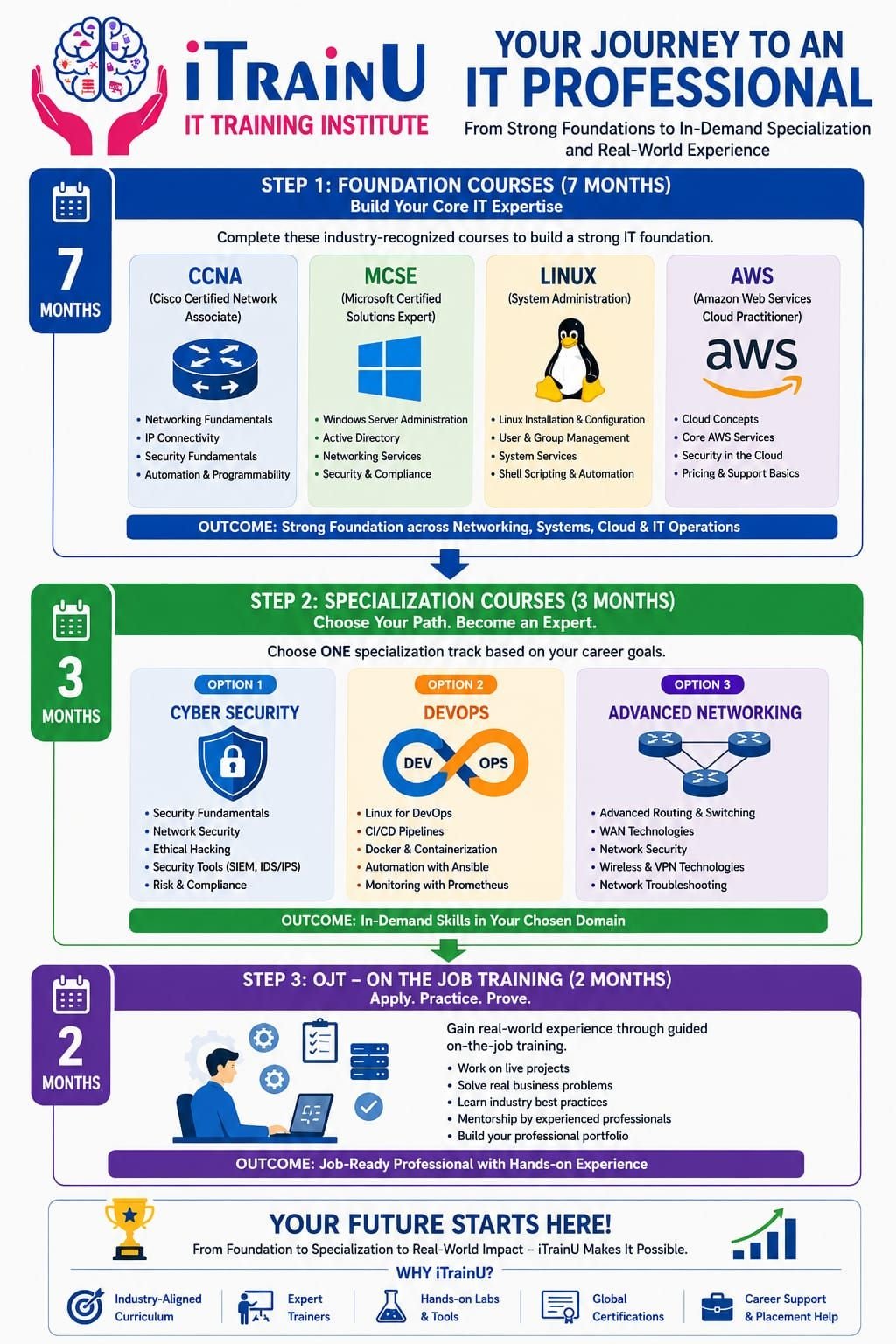
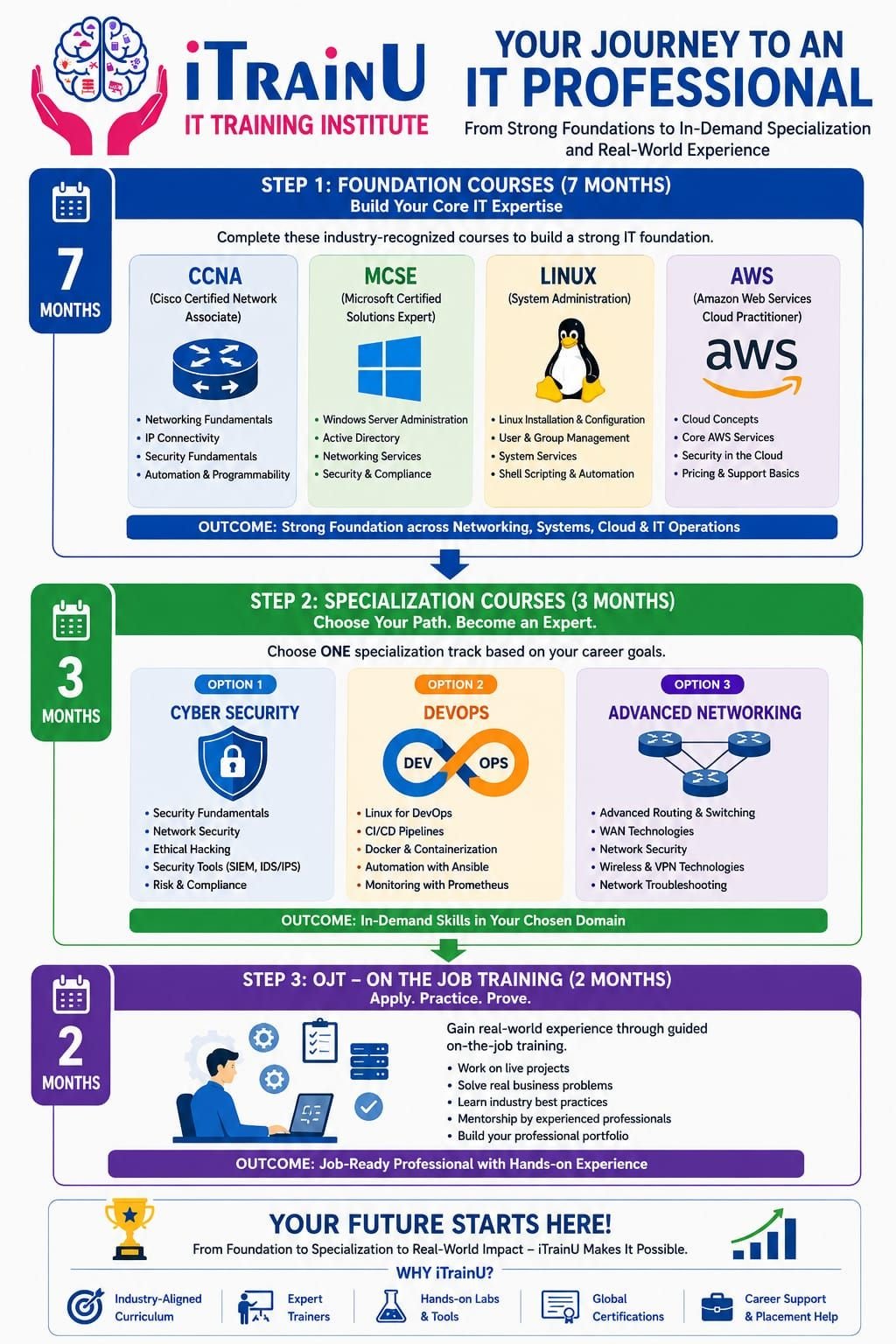
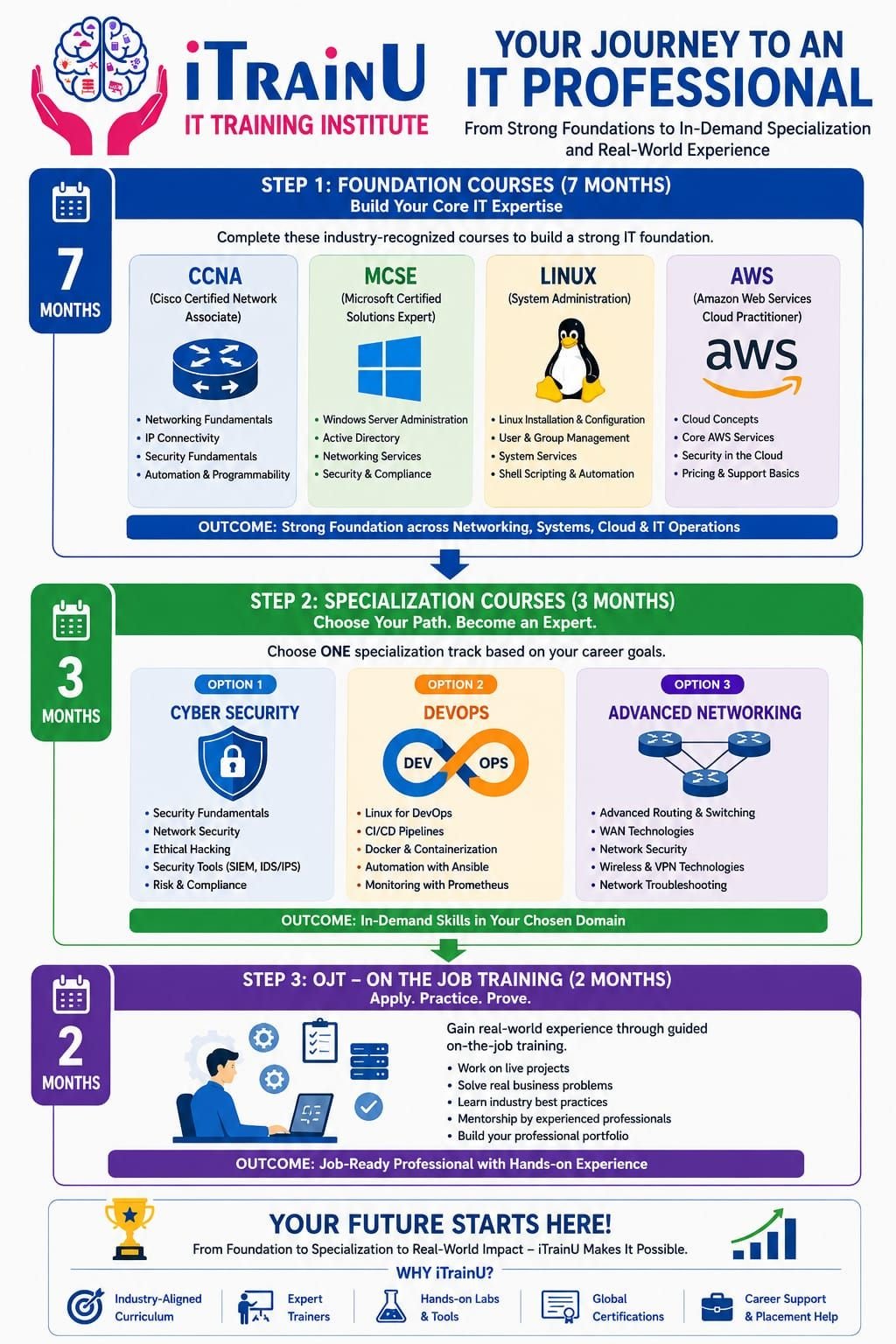
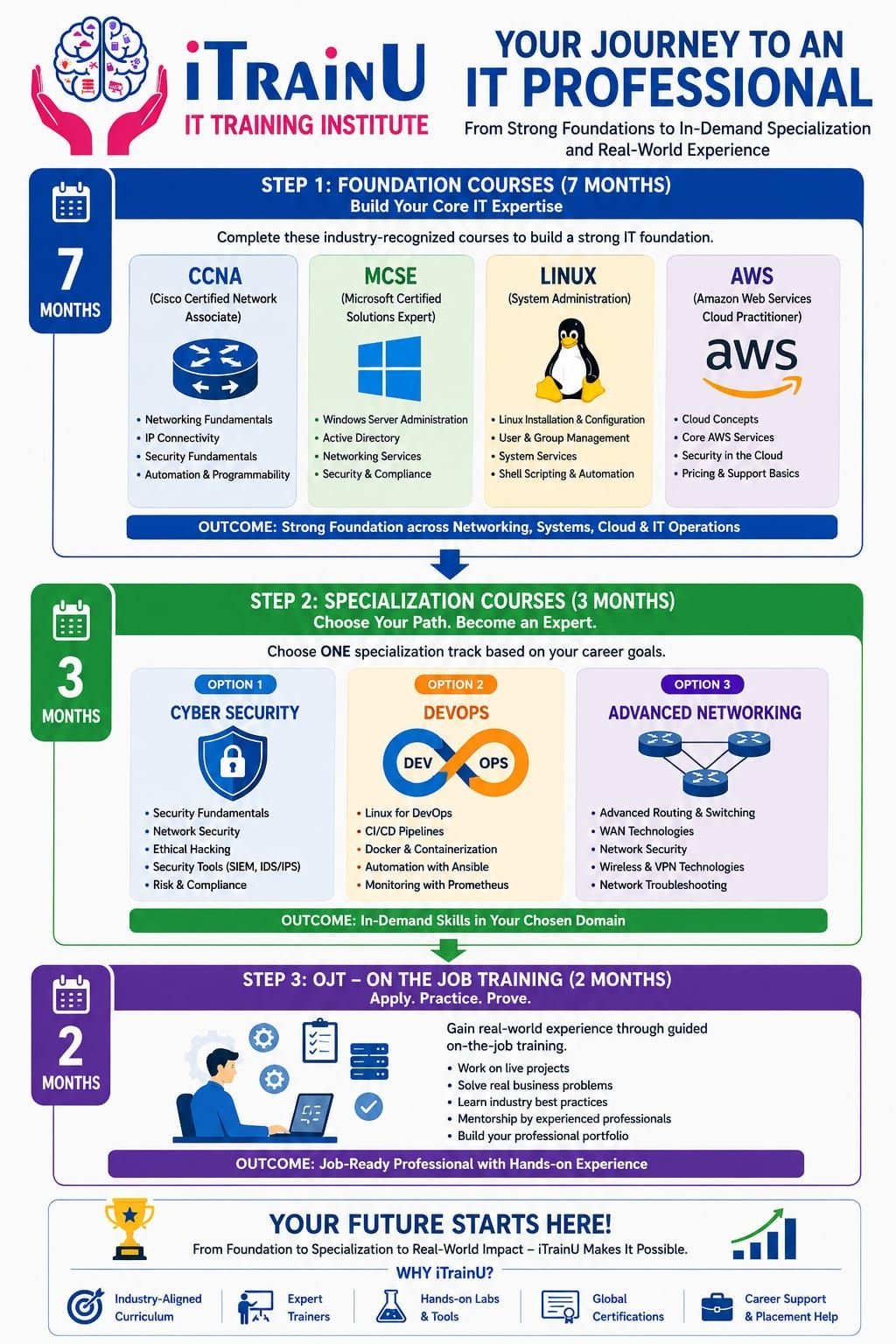
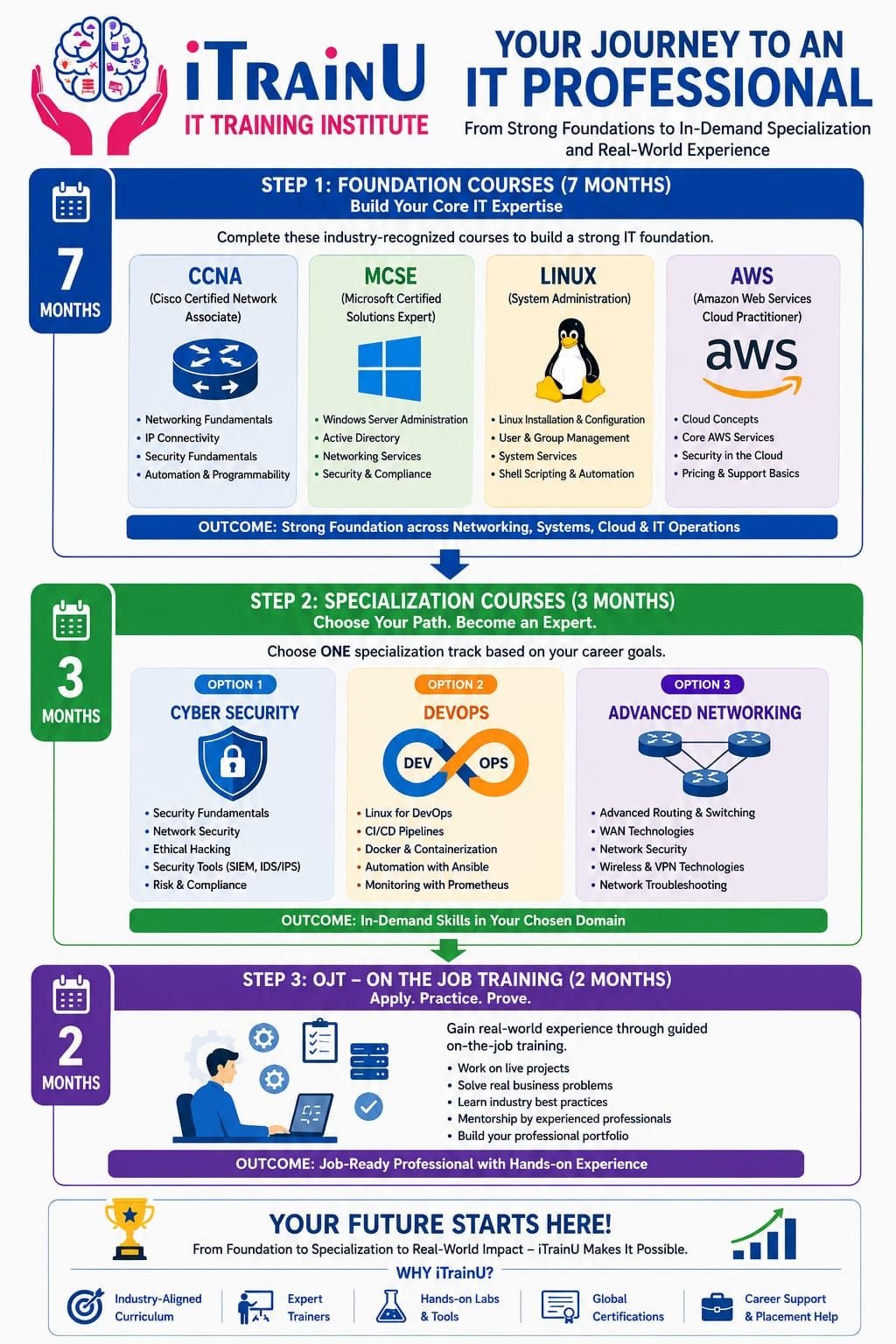
iTrainU’s 12-month IT career pathway is designed for this purpose. It combines a seven-month foundation, a three-month specialization, and two months of on-the-job training at Fluke Infotech.
📘 Website: itrainu.in
✉️ Email: info@itrainu.in
💬 WhatsApp: Chat with iTrainU
🔗 LinkedIn: iTrainU Institute
📸 Instagram: @itrainu
▶️ YouTube: iTrainU Institute

Why IT skills matter in Vapi’s industrial belt
Industrial companies depend on technology at almost every operational level. A manufacturing facility may use:
- Networked computers across offices, warehouses, and production areas
- Windows servers and Active Directory for user management
- Linux servers for applications, monitoring, and automation
- Cloud services for backup, reporting, and business continuity
- Firewalls and VPNs for secure remote access
- CCTV, access control, ERP, and inventory systems
- Multiple branches connected through wide-area networks
A network outage can stop communication. A security incident can expose business data. Poor server management can affect production systems. This creates demand for professionals who understand both IT fundamentals and business environments.
The iTrainU 12-month IT career roadmap
Phase 1: Seven-month Foundation Level
The Foundation Level builds your core knowledge before you choose a specialization. It includes CCNA, MCSE-aligned Microsoft technologies, Linux, AWS, and English communication.
This sequence is useful because IT systems are connected. A cloud engineer needs Linux and networking knowledge. A cybersecurity analyst needs operating system and network fundamentals. A system administrator needs Windows, Linux, troubleshooting, and communication skills.
1. CCNA and networking fundamentals
CCNA is a networking foundation that explains how devices communicate.
You learn concepts such as:
- IP addressing and subnetting
- VLANs and trunking
- Routing and switching
- DHCP, DNS, NAT, and access control lists
- Wireless networking
- VPN and firewall fundamentals
- Network troubleshooting and monitoring
For example, if a Vapi manufacturing unit has separate office, production, guest, and security-camera networks, VLANs can help separate traffic. Routing and firewall rules can then control communication between these networks.
Explore the iTrainU CCNA Training course.
2. Linux system administration
Linux is an operating system widely used in servers, cloud platforms, containers, and security tools.
Linux training helps you understand:
- File systems and permissions
- Users, groups, and access control
- Processes and system services
- Package management
- Networking commands
- Shell scripting
- Log analysis and troubleshooting
A simple beginner practice task looks like this:
# Display the current IP configuration
ip addr

# Check whether SSH is running
systemctl status ssh

# Display the last system log entries
journalctl -n 20
These commands help you inspect a server’s network configuration, service status, and recent logs.
3. MCSE and Microsoft infrastructure concepts
MCSE represents a Microsoft infrastructure and systems administration learning direction.
Although Microsoft certification paths evolve over time, the underlying skills remain important. You should understand:
- Windows Server administration
- Active Directory and user management
- Group Policy
- DNS and DHCP services
- File and print services
- Backup and access permissions
- Security and compliance principles
In an industrial organisation, an IT administrator may create employee accounts, apply department-based policies, manage shared folders, and troubleshoot authentication issues. These are practical skills that support everyday business operations.
4. AWS cloud fundamentals
AWS is a cloud platform that provides computing, storage, networking, databases, and security services.
At the foundation level, you learn:
- Cloud concepts and service models
- Compute, storage, and networking basics
- Identity and access management
- Cloud security fundamentals
- Pricing and support concepts
- Backup and availability principles
A company may use cloud storage for document backup or host a business application on a cloud server. Understanding AWS helps you support modern infrastructure instead of working only with on-premises systems.
5. English communication
Technical knowledge is more useful when you can explain it clearly. English training supports:
- Writing support tickets
- Explaining incidents to users
- Creating technical documentation
- Participating in interviews
- Communicating with vendors and customers
Phase 2: Three-month Specialization Track
After building your foundation, you select one specialization based on your career goals.

Track A: Cloud and DevOps
DevOps combines development and operations through collaboration, automation, and continuous delivery.
You can learn tools and practices such as:
- Git and version control
- Jenkins and CI/CD pipelines
- Docker containers
- Kubernetes fundamentals
- Ansible automation
- Cloud deployment
- Monitoring and troubleshooting
This track is suitable if you want to work toward roles such as Cloud Support Engineer, DevOps Engineer, Linux Engineer, or Site Reliability Associate.
See the iTrainU DevOps Training course.

Track B: Cyber Security and Ethical Hacking
Cybersecurity is the practice of protecting systems, networks, applications, and data from unauthorised access and attacks.
Cybersecurity has become a long-term career area because organisations must protect customer data, employee accounts, cloud resources, and operational systems. Many companies also have contractual, regulatory, or internal security requirements.
Training may cover:
- Security fundamentals
- Footprinting and reconnaissance
- Vulnerability assessment
- Network security
- Ethical hacking methodology
- Web and wireless security
- Cryptography
- SIEM, IDS, and IPS concepts
- Incident response and reporting
Ethical hacking must always be performed with permission, within a defined scope, and in a controlled lab environment.
Explore the iTrainU Cyber Security and Ethical Hacking course.

Track C: Advanced Networking
Advanced networking focuses on designing, securing, and managing enterprise connectivity.
This track can include:
- Advanced routing and switching
- SD-WAN concepts
- Aruba networking
- Fortigate firewall administration
- VPN configuration
- Network segmentation
- Firewall policies
- Troubleshooting and monitoring
SD-WAN helps organisations manage connectivity across branches and locations. Fortigate skills are valuable for firewall configuration, security policies, VPNs, traffic inspection, and secure network access.
These technologies can support higher-paying career paths because they require a combination of networking, security, troubleshooting, and vendor-specific knowledge. Pay still depends on experience, certification, projects, and employer requirements.
Phase 3: Two-month OJT at Fluke Infotech
On-the-job training is the stage where you apply your knowledge to practical work.
During the two-month OJT at Fluke Infotech, you can work on activities such as:
- Troubleshooting network and system issues
- Documenting configurations
- Supporting users and devices
- Working with servers and firewalls
- Reviewing security procedures
- Understanding ticketing and escalation
- Building practical project evidence for your resume
The purpose of OJT is to help you move from “I studied this topic” to “I can perform this task in a work environment.”
Before and after: the value of a structured pathway
Before structured training
- You may know isolated commands without understanding the full system.
- You may struggle to explain projects during interviews.
- You may not know whether to choose cloud, security, or networking.
- You may lack practical lab experience.
- Your resume may show theory but not applied skills.
After the iTrainU pathway
- You understand networks, servers, cloud, and communication.
- You select a specialization based on your interests.
- You practise through labs, assignments, and projects.
- You gain workplace exposure through OJT.
- You receive placement assistance, interview preparation, and career guidance.
How to choose the right specialization
- Choose Cloud and DevOps if you enjoy automation, Linux, deployment, and cloud platforms.
- Choose Cyber Security if you’re interested in threat detection, ethical hacking, investigation, and risk reduction.
- Choose Advanced Networking if you enjoy routing, firewalls, connectivity, and infrastructure troubleshooting.
Common mistakes to avoid
- Learning tools without understanding networking and operating systems
- Memorising commands without practising real scenarios
- Ignoring documentation and communication skills
- Attempting security testing without written permission
- Collecting certificates without building projects
- Choosing a specialization only because it appears popular
Pro Tips for learners in Vapi
- Practise troubleshooting using industrial examples such as branch connectivity, server downtime, and user access.
- Build a small home lab with virtual machines and network simulators.
- Maintain a project journal with diagrams, commands, screenshots, and solutions.
- Learn how to explain technical problems in simple English.
- Ask about lab access, trainer experience, project work, OJT, and placement support before enrolling.
- Review the iTrainU placement assistance program.
- Use the contact page to ask about online, classroom, and flexible batch options.
FAQs
Is this IT training roadmap suitable for beginners?
Yes. The pathway begins with foundational networking, systems, cloud, and communication skills before moving to an advanced specialization.
Which track is best for a chemical or manufacturing company?
All three can be relevant. Advanced Networking supports plant connectivity and firewalls. Cybersecurity supports protection and compliance. Cloud and DevOps support applications, automation, and infrastructure.
Do I need previous IT experience?
No strict experience is required for the foundation stage. Basic computer knowledge, regular practice, and a willingness to learn are helpful.
Can this course help with placement?
iTrainU provides placement assistance that may include resume support, interview preparation, mock interviews, career guidance, and job opportunity support. Placement outcomes depend on your skills, attendance, performance, and the requirements of employers.
Is SD-WAN and Fortigate training useful?
Yes. These skills are useful for enterprise networking, branch connectivity, firewall administration, VPNs, and network security. They can strengthen your profile when combined with CCNA-level networking knowledge and practical experience.
Start your IT career journey from Vapi
A strong IT career is built step by step. Start with CCNA, Linux, Microsoft infrastructure, AWS, and English communication. Then specialise in Cloud and DevOps, Cyber Security and Ethical Hacking, or Advanced Networking with SD-WAN, Aruba, and Fortigate. Finally, apply your knowledge through OJT at Fluke Infotech.
🎓 Enquire with iTrainU: Visit the official website
💬 WhatsApp icon: Chat on WhatsApp
✉️ Email icon: info@itrainu.in
🔗 LinkedIn icon: Follow iTrainU Institute
📸 Instagram icon: Follow @itrainu
▶️ YouTube icon: Watch iTrainU videos
Meta Title: Best IT Training Institute in Vapi | iTrainU 2026 Roadmap
Meta Description: Explore iTrainU’s 12-month IT career roadmap for Vapi learners, covering CCNA, Linux, MCSE, AWS, DevOps, cybersecurity, SD-WAN, Fortigate, and OJT.
#Bhopal #Raipur #Mumbai #NaviMumbai #Thane #Noida #Gurugram #Vashi #Andheri #Pithampur #VijayNagarIndore #Satna #Katni #Meghnagar #Mandideep #Dewas #SuperCorridorIndore #Jabalpur #GovindpuraBhopal #Gwalior #SanwerRoadIndore #Nasik #Nagpur #Dhar #Dhule #Pune #Jewar #GiftCity #Ahmedabad #Vadodara #Surat #Silvassa #Dholera #Dahod #Rajkot #Kolkata #Durgapur #Bhubaneshwar #Ranchi #Jamshedpur #Delhi #Hyderabad #Goa #Jaipur #Vapi #Lucknow #GreaterNoida #NewDelhi #Coimbatore #Chennai #Bengaluru #Gachibowli #Ameerpet #Vijayawada #Sholapur #Kolhapur #Gorakhpur #Sagar #Mohali #Chandigarh #Jodhpur #Patna #Gurgaon #Gandhinagar #Dehradun #GeetaBhawanIndore #ElectronicCity #Marathahalli #Jayanagar #Wakad #Hinjewadi #KarveNagar #CyberCity #DLF #HitechCity #Madhapur #Kondapur #Magarpatta #Kharadi #Aundh #Baner #Bandra #Airoli #Sholinganallur #Perungudi #BKC #Parel #Mahim #Borivali #NehruPalace #Satellite #SaltLakeCity #Newtown #Rajarhat #RajivGandhiTechnologyPark #ITPark #Whitefield #Koramangala #Sarjapur #Manipur #Bhadrak #Kurla #Indore #systems #business #technology #design #system #engineering #automation #innovation #productivity #businesssystems #entrepreneur #software #systemsthinking #solutions #softwares #industry #installation #security #businessdevelopment #routing #switching #cisco #firewall #paloalto #fortigate #fortinet #hp #aruba #cabling #datacenter #akcp #indore #Bhopal #India #cio #cto #itmanager #networkengineer #cloud #aws #best #intigrator #IT #vendor #provider #cctv #server #storage #project #itsm #itil